チャットボットv2.10公開:スピード、スケーラビリティ、シンプルさの向上でユーザーエクスペリエンスを高める
FastAPIと非同期処理でチャットボットを再構築し、レスポンス時間を短縮しながら インターフェースをシンプルにしました。ターゲットを絞った最適化がユーザーエクスペリエンスをどう変えたかをご紹介します。
アップデート(2026年): このチャットボットはSydneyに進化しました!FlaskからFastAPI、FAISSからWeaviate、そしてSupabase pgvectorへと多くのイテレーションを経て、Sydneyは現在/ask/で活動し、Claudeとストリーミングレスポンスを使用しています。以下のFastAPIパターンは、現在の形に至るまでの踏み台でした。
2024年2月のオリジナル記事は、コンテキストとして以下に保存しています。
2週間前、Langchainフレームワークを活用し、FAISSをベクトルストアとして使用したチャットボットv2のニュースを共有しました。数ヶ月にわたるイテレーション作業の後、コーディングの泥沼からどう脱出したかという生々しい話でした。
バージョン2はバージョン1から大幅に改善されましたが、まだ不満な点が多くありました。最大の問題はおそらくパフォーマンスです。より正確に言えば、遅すぎるのです :P また、フロントエンドのインターフェースは紹介文が多すぎて複雑だったので、チャットボックスが画面のかなり下にありました。
この記事では、v2.10がどのようにターゲットを絞ったパフォーマンス最適化とUX改善を適用して、よりスムーズで、より速く、より高機能な会話体験を実現したかを紹介します。
FastAPIへの移行:パフォーマンスの飛躍
v2.10の強化されたパフォーマンスの根幹は、FastAPIへの移行にあります。このモダンなWebフレームワークは、レスポンス時間を加速するだけでなく、より堅牢でスケーラブルなアーキテクチャを導入します。
v2 Flaskフレームワーク
# Initialize Flask app and Langchain agent
app = Flask(__name__)
CORS(app, resources=\{r"/query_blog": {"origins": "https://www.chandlernguyen.com"\}})
app.debug = False
limiter = Limiter(app=app, key_func=get_remote_address)
Flaskはシンプルさと柔軟性を提供してくれました。しかし、ユーザーベースが拡大するにつれて、よりパフォーマンスの高いソリューションの必要性が明らかになりました。
v2.1 FastAPIフレームワーク
# FastAPI with advanced CORS and async support
# Initialize FastAPI app
app = FastAPI()

# Configure CORS for production, allowing only your frontend domain
origins = ["https://www.chandlernguyen.com"]

app.add_middleware(
    CORSMiddleware,
    allow_origins=origins,
    # allow_origins=["*"],
    allow_credentials=True,
    allow_methods=["POST"],
    allow_headers=["Content-Type"],
)
FastAPIは非同期サポートによりパフォーマンスを向上させます。
非同期処理:よりスムーズな会話
FastAPIの非同期機能を活用し、v2ではノンブロッキングなリクエスト処理を導入しました。これにより、よりスムーズでダイナミックなユーザーインタラクションが可能になります。以下はその例です。
# Function to check content with OpenAI Moderation API (sensitive keys are loaded from environment variables)
async def is_flagged_by_moderation(content: str) -> bool:
    openai_api_key = os.getenv('OPENAI_API_KEY')
    if not openai_api_key:
        logging.error("OPENAI_API_KEY not set in environment variables")
        raise HTTPException(status_code=500, detail="Server configuration error")

    headers = \{"Authorization": f"Bearer {openai_api_key\}"}
    data = \{"input": content\}

    async with httpx.AsyncClient() as client:
        response = await client.post("https://api.openai.com/v1/moderations", json=data, headers=headers)

    if response.status_code == 200:
        response_json = response.json()
        return any(result.get("flagged", False) for result in response_json.get("results", []))
    else:
        logging.error(f"Moderation API error: {response.status_code} - {response.text}")
        return False
ユーザーインターフェースの改善
v2.10のフロントエンドは、視覚的な魅力とユーザーエンゲージメントを高めるために再設計されました。アクセシビリティとユーザーエクスペリエンスに重点を置き、新しいデザインはよりシンプルで直感的になっています。
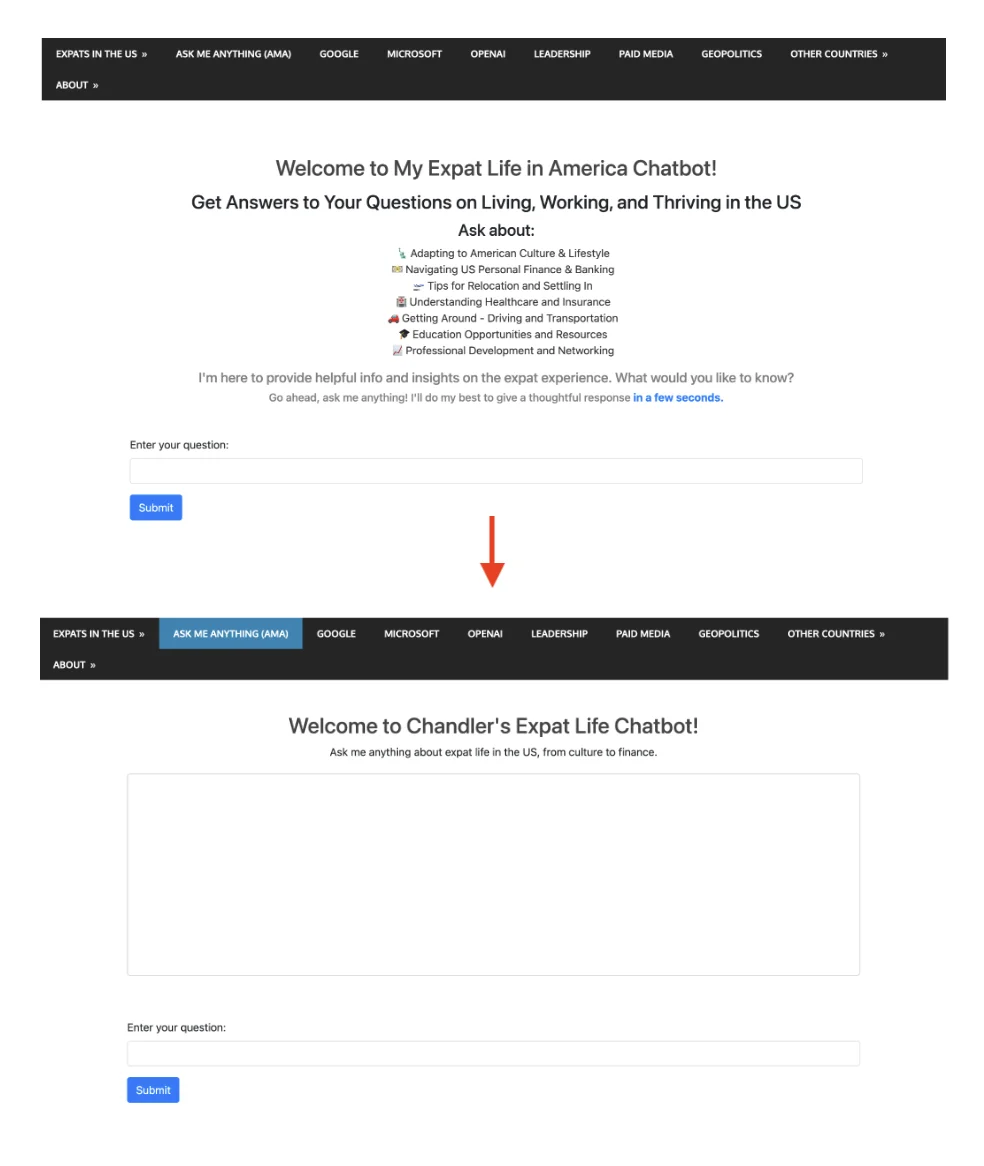
過剰な紹介コンテンツの削減
このテキストの塊がなくなりました。
<div class="container mt-5">
  <h2 style="color: #454545; text-align: center;">Welcome to My Expat Life in America Chatbot!</h2>
  <h3 style="margin-top: 15px; text-align: center;">
    Get Answers to Your Questions on Living, Working, and Thriving in the US
  </h3>
  <h4 style="margin-top: 10px; text-align: center;">Ask about:</h4>
  <ul style="list-style: none; text-align: center; color: #333;">
    <li>Adapting to American Culture & Lifestyle</li>
    <li>Navigating US Personal Finance & Banking</li>
    <li>Tips for Relocation and Settling In</li>
    <li>Understanding Healthcare and Insurance</li>
    <li>Getting Around - Driving and Transportation</li>
    <li>Education Opportunities and Resources</li>
    <li>Professional Development and Networking</li>
  </ul>
  <h5 style="margin-top: 10px; color: grey; text-align: center;">
    I'm here to provide helpful info and insights on the expat experience. What would you like to know?
  </h5>
  <h6 style="margin-top: 5px; color: grey; text-align: center;">
    Go ahead, ask me anything! I'll do my best to give a thoughtful response <span style="font-weight: bold; color: #007bff;">in a few seconds.</span>
  </h6>
これが置き換え後です
<h2 style="color: #454545; text-align: center;">Welcome to Chandler's Expat Life Chatbot!</h2>
    <p style="text-align: center; margin-bottom: 20px;">Ask me anything about expat life in the US, from culture to finance.</p>
視覚的には、変更はこのようになります
ホワイトスペースの削減とレイアウト改善のための追加スタイル
<style>
        /* Additional styles to reduce white space and improve layout */
        body, html \{
            height: 100%;
            margin: 0;
            display: flex;
            flex-direction: column;
        \}
        .container \{
            flex-grow: 1;
            display: flex;
            flex-direction: column;
            justify-content: center; /* Center vertically in the available space */
        \}
        #conversation \{
            height: 300px; /* Adjust based on your preference */
            overflow-y: auto;
            border: 1px solid #ccc; /* Add border to conversation box */
            padding: 10px;
            border-radius: 5px; /* Optional: round corners */
        \}
    </style>
#conversationボックスのスタイリングは、指定された高さとオーバーフロー制御により、クリーンでユーザーフレンドリーなチャットインターフェースを維持するのに特に効果的です。
<!-- Area to display the conversation -->
    <div id="conversation" aria-live="polite" class="mb-5" style="height: 300px; overflow-y: auto;"></div>
conversation divにaria-live="polite"を追加したのは、スクリーンリーダーユーザーへの思慮深い配慮であり、動的なコンテンツの変更を通知してくれます。
入力フィールドへのオートフォーカス
AJAXのsuccessとerrorコールバックの最後に$('#user-query').focus();を追加したことは、ユーザーフレンドリーな機能です。各メッセージ送信後に入力フィールドが自動的にフォーカスされるため、よりスムーズなチャット体験が実現します。
Langsmithを活用したパフォーマンスモニタリングとオブザーバビリティ
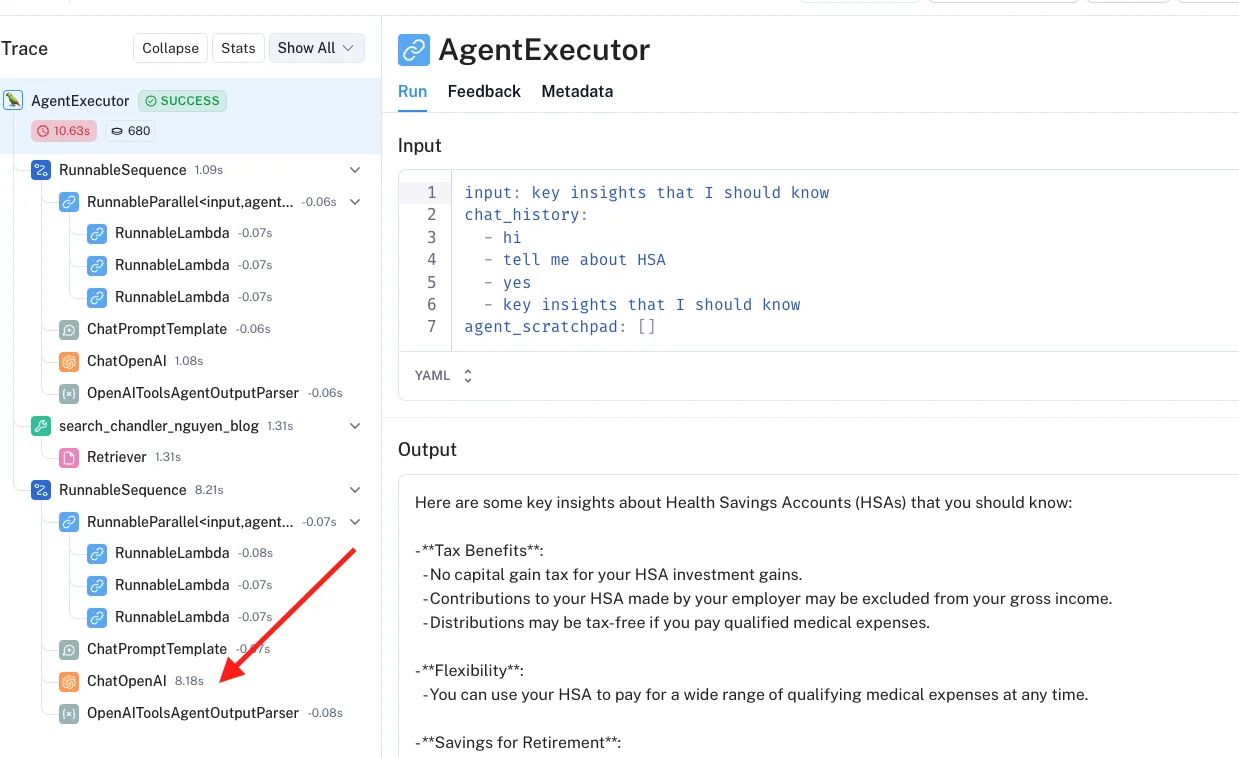
このバージョン2.10では、langsmithを活用しています。セットアップはかなり簡単で、ダッシュボードのインターフェースも十分に直感的です。
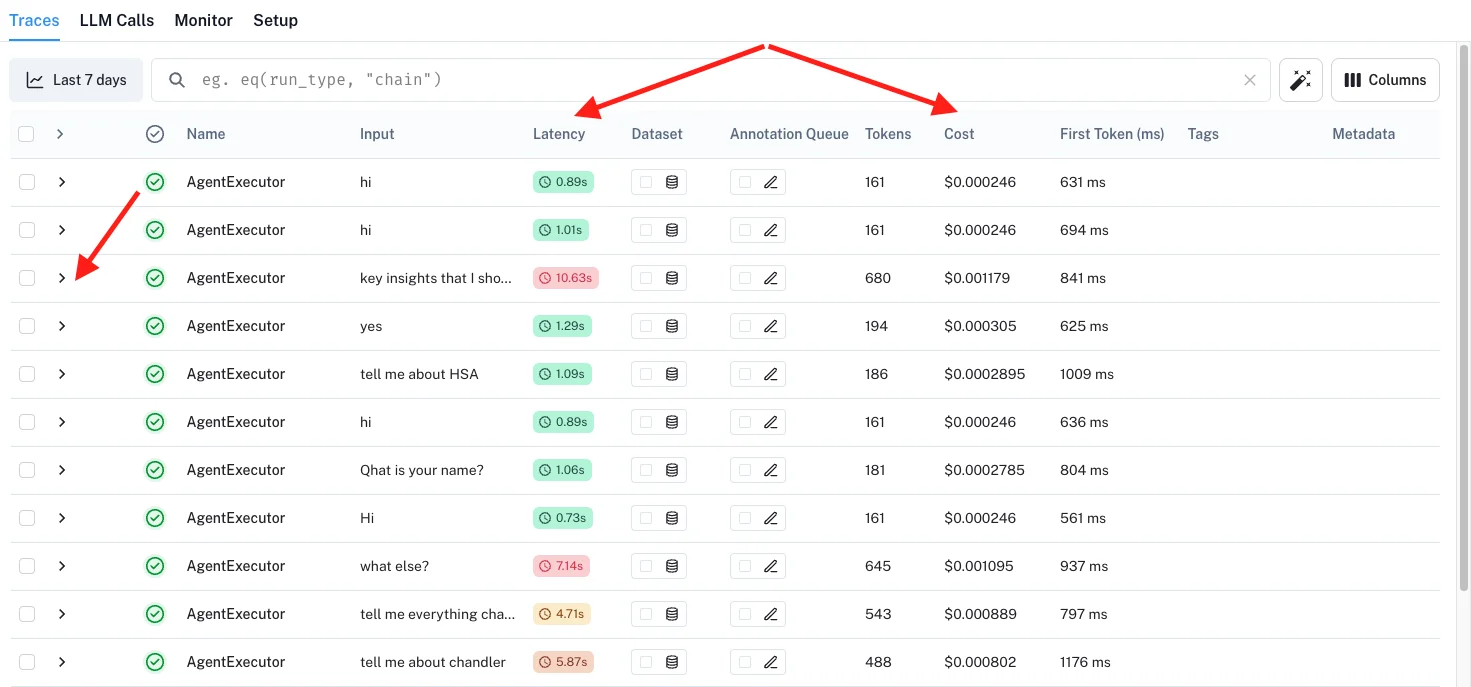
特定のクエリが時間がかかりすぎていることに気づいたら、それを「クリック」して、ジャーニーのどの部分が問題なのかを正確に理解できます。
バージョン2.1の完全なバックエンドコード
いつものように、完全なバックエンドコードをGitHub こちらで共有しています。以前のバージョンのチャットボット2.0と同じリポジトリにあります。
ぜひチャットボットを試してみてください :D 過去16年間に書いたことについて何でも聞いてみてください。
チャットボットを構築したり、フレームワーク間を移行した経験はありますか?どんなパフォーマンスの工夫がうまくいったか、ぜひお聞きしたいです。
よろしくお願いします、Chandler