Chatbot v2.10 发布:通过更快速度、更强扩展性与更简体验提升用户感受
我用 FastAPI 和异步处理重构了聊天机器人,显著缩短响应时间并简化交互界面——下面是这些针对性优化如何改变用户体验。
更新(2026): 这个 chatbot 后来演进成了 Sydney!经历了多轮迭代——从 Flask 到 FastAPI,从 FAISS 到 Weaviate 再到 Supabase pgvector——Sydney 现在在 /ask/,并使用 Claude 流式回复。下面的 FastAPI 模式是通往当前架构的重要一步。
以下保留 2024 年 2 月原文以供参考。
两周前我分享了 chatbot v2 的发布:基于 Langchain 框架,向量库用 FAISS。那篇更像一段“从编码流沙中爬出来”的原始记录。
虽然 v2 相比 v1 已经进步很大,但仍有不少我不满意的问题。最大问题可能是性能——准确说,太慢了 :P 另外前端界面也过于复杂,介绍文案太多,导致输入框在页面上位置过低。
这篇会重点讲 v2.10 如何通过针对性性能优化和 UX 改造,带来更顺滑、更快、更可用的对话体验。
切换到 FastAPI:一次性能跃迁
v2.10 性能提升的核心,在于迁移到 FastAPI。这个现代 web 框架不仅提升响应速度,也提供了更稳健、可扩展的架构基础。
v2 Flask framework
# Initialize Flask app and Langchain agent
app = Flask(__name__)
CORS(app, resources={r"/query_blog": {"origins": "https://www.chandlernguyen.com"}})
app.debug = False
limiter = Limiter(app=app, key_func=get_remote_address)
Flask 帮了我们很久,简单且灵活。但随着用户规模增长,我们需要更高性能方案。
v2.1 FastAPI framework
# FastAPI with advanced CORS and async support
# Initialize FastAPI app
app = FastAPI()

# Configure CORS for production, allowing only your frontend domain
origins = ["https://www.chandlernguyen.com"]

app.add_middleware(
    CORSMiddleware,
    allow_origins=origins,
    # allow_origins=["*"],
    allow_credentials=True,
    allow_methods=["POST"],
    allow_headers=["Content-Type"],
)
FastAPI 通过异步支持带来更高性能。
异步处理:让对话更顺滑
借助 FastAPI 的异步能力,v2 实现了非阻塞请求处理,用户交互体验更流畅。示例如下。
# Function to check content with OpenAI Moderation API (sensitive keys are loaded from environment variables)
async def is_flagged_by_moderation(content: str) -> bool:
    openai_api_key = os.getenv('OPENAI_API_KEY')
    if not openai_api_key:
        logging.error("OPENAI_API_KEY not set in environment variables")
        raise HTTPException(status_code=500, detail="Server configuration error")

    headers = {"Authorization": f"Bearer {openai_api_key}"}
    data = {"input": content}

    async with httpx.AsyncClient() as client:
        response = await client.post("https://api.openai.com/v1/moderations", json=data, headers=headers)

    if response.status_code == 200:
        response_json = response.json()
        return any(result.get("flagged", False) for result in response_json.get("results", []))
    else:
        logging.error(f"Moderation API error: {response.status_code} - {response.text}")
        return False
用户界面改造
v2.10 前端重做后更强调可读性和可用性。整体更简洁,也更直观。
删除过量引导文案
下面这大段现在已经移除。
<div class="container mt-5">
  <h2 style="color: #454545; text-align: center;">Welcome to My Expat Life in America Chatbot!</h2>
  <h3 style="margin-top: 15px; text-align: center;">
    Get Answers to Your Questions on Living, Working, and Thriving in the US
  </h3>
  <h4 style="margin-top: 10px; text-align: center;">Ask about:</h4>
  <ul style="list-style: none; text-align: center; color: #333;">
    <li>Adapting to American Culture & Lifestyle</li>
    <li>Navigating US Personal Finance & Banking</li>
    <li>Tips for Relocation and Settling In</li>
    <li>Understanding Healthcare and Insurance</li>
    <li>Getting Around - Driving and Transportation</li>
    <li>Education Opportunities and Resources</li>
    <li>Professional Development and Networking</li>
  </ul>
  <h5 style="margin-top: 10px; color: grey; text-align: center;">
    I'm here to provide helpful info and insights on the expat experience. What would you like to know?
  </h5>
  <h6 style="margin-top: 5px; color: grey; text-align: center;">
    Go ahead, ask me anything! I'll do my best to give a thoughtful response <span style="font-weight: bold; color: #007bff;">in a few seconds.</span>
  </h6>
替换为更短版本:
<h2 style="color: #454545; text-align: center;">Welcome to Chandler's Expat Life Chatbot!</h2>
    <p style="text-align: center; margin-bottom: 20px;">Ask me anything about expat life in the US, from culture to finance.</p>
视觉变化如下:
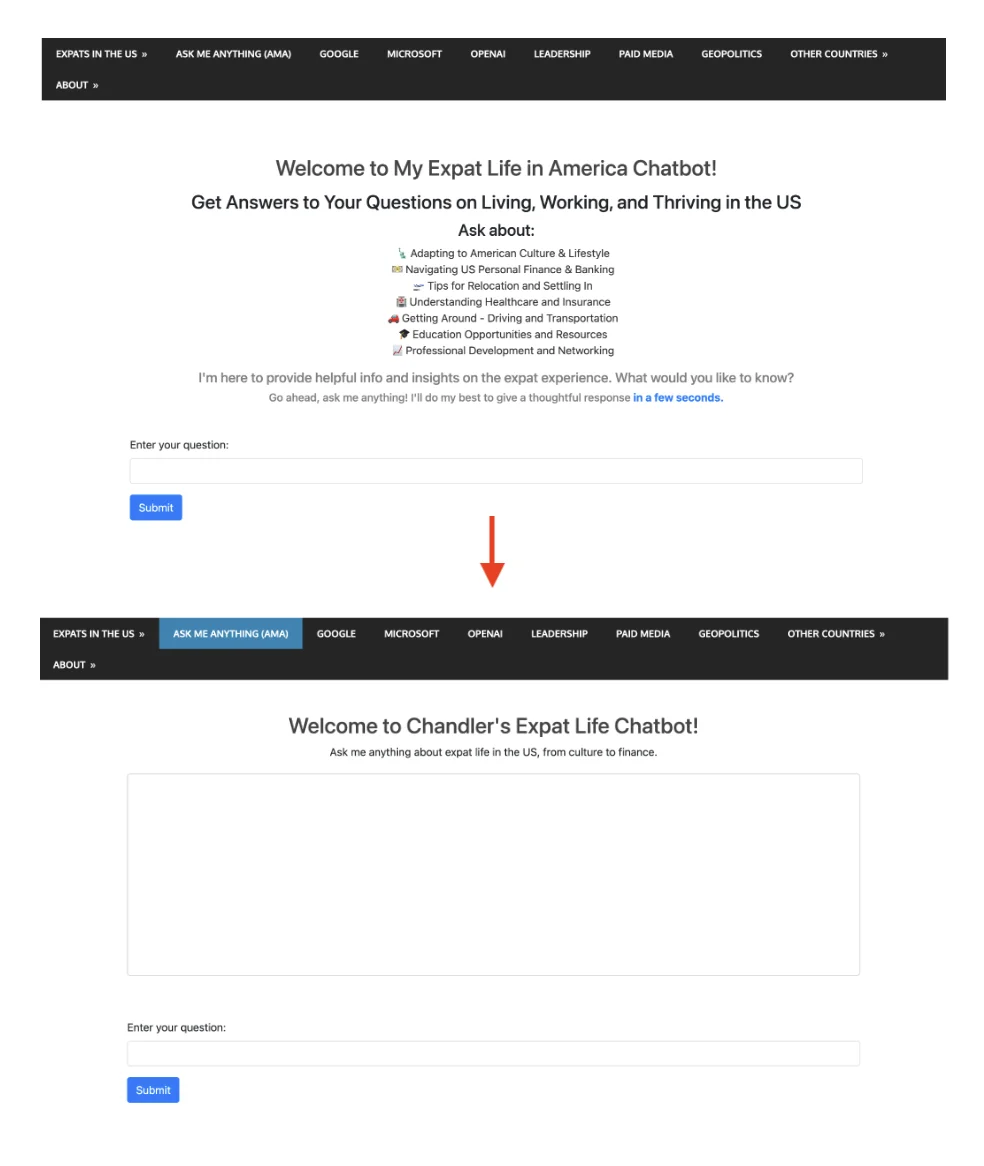
增加样式,减少白区并优化布局
<style>
        /* Additional styles to reduce white space and improve layout */
        body, html {
            height: 100%;
            margin: 0;
            display: flex;
            flex-direction: column;
        }
        .container {
            flex-grow: 1;
            display: flex;
            flex-direction: column;
            justify-content: center; /* Center vertically in the available space */
        }
        #conversation {
            height: 300px; /* Adjust based on your preference */
            overflow-y: auto;
            border: 1px solid #ccc; /* Add border to conversation box */
            padding: 10px;
            border-radius: 5px; /* Optional: round corners */
        }
    </style>
其中 #conversation 的固定高度与 overflow 控制,对保持聊天区域整洁可读非常有效。
<!-- Area to display the conversation -->
    <div id="conversation" aria-live="polite" class="mb-5" style="height: 300px; overflow-y: auto;"></div>
给 conversation div 加 aria-live="polite" 也是一个细节优化,屏幕阅读器用户能更好感知动态内容变化。
输入框自动聚焦
在 AJAX 成功/失败回调末尾加入 $('#user-query').focus();,体验会明显更顺。每次提交后输入框自动获得焦点,用户可连续对话。
用 Langsmith 做性能监控与可观测性
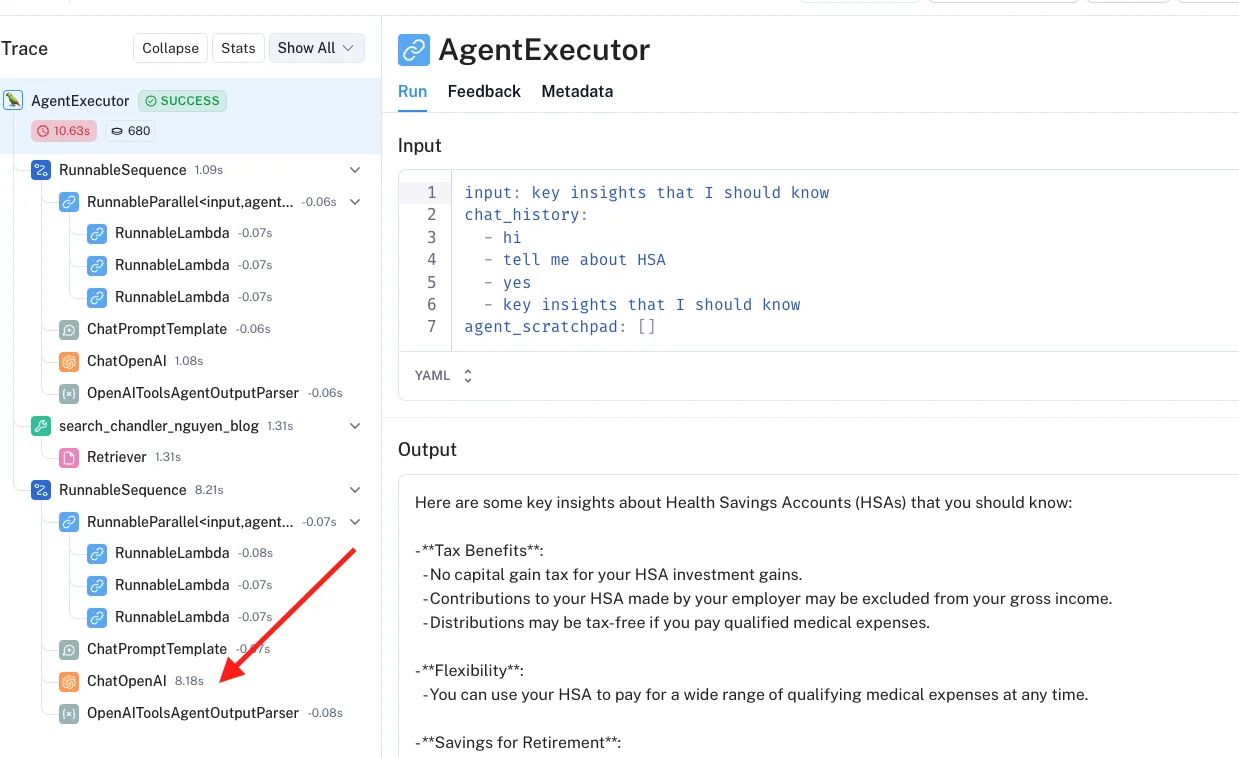
在 v2.10 里我也接入了 langsmith。配置很简单,dashboard 也足够直观。
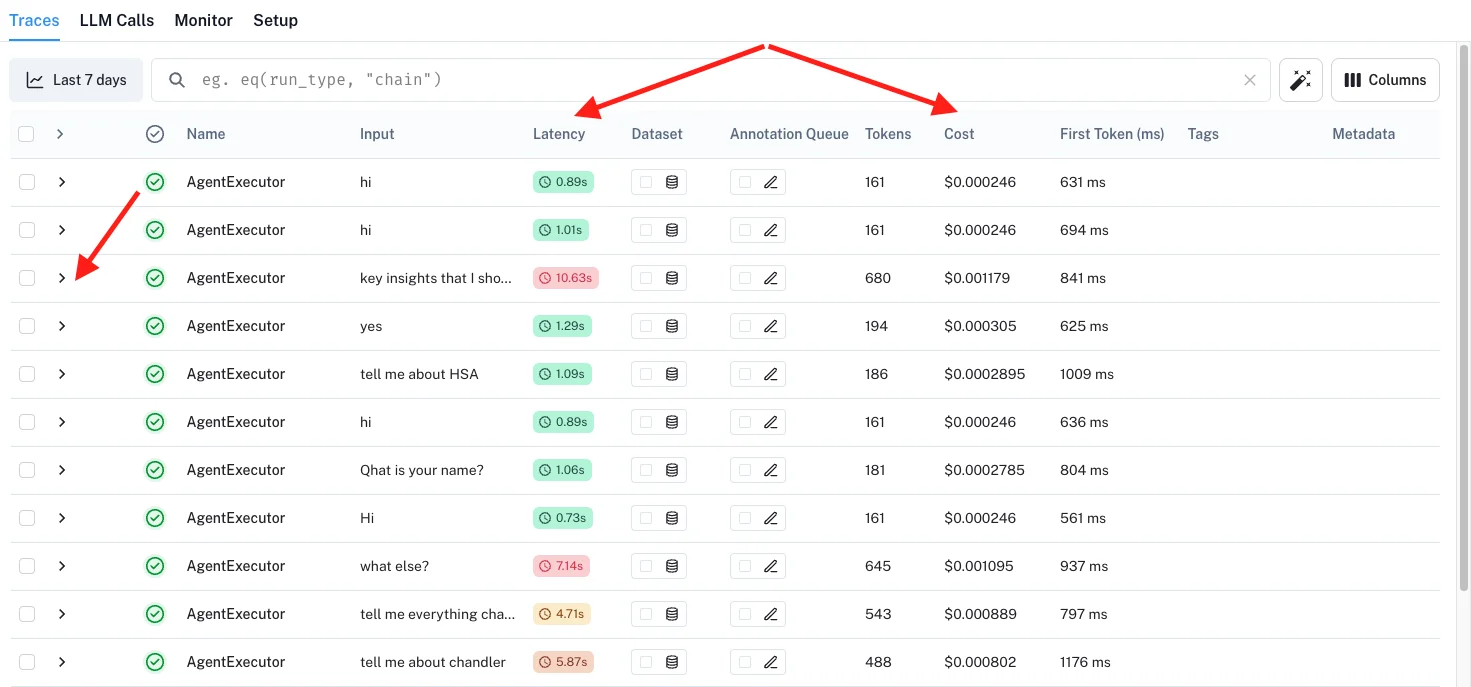
当我发现某个 query 慢时,可以直接点进去看链路,精确定位慢点在哪一段。
2.1 版本完整后端代码
照例,我把 v2.1 完整后端代码开源在 GitHub:here。与 2.0 版本在同一个 repo。
欢迎你去 chatbot 试试 :D 随便问它我过去 16 年写过的内容。
你有做过 chatbot,或者经历过框架迁移吗?很想听听你有哪些性能优化技巧是有效的。
致敬,
Chandler