क्या आप Mobile दुनिया के लिए तैयार हैं? आपके पास क्या options हैं?
Smartphones brands को customers के साथ एक intimate channel देते हैं — लेकिन क्या आपकी site तैयार है? Mobile sites, native apps और responsive design के options जानें।
यह पोस्ट 2013 में लिखी गई थी। तब से कुछ जानकारी बदल सकती है।
करोड़ों smartphone users हर दिन अपना phone use करते हैं — तो हम इसका फायदा कैसे उठाएं? "लगातार बढ़ते consumers के लिए, अलग-अलग markets, income levels और demographics में, mobile phone वह device और communication channel है जो उनके दिल के सबसे करीब है। यह definition के अनुसार intimate और personal है, हर जगह साथ रहती है, दिन भर use होती है और personal photos लेकर-save करके, music download करके, wallpapers add करके, shortcuts बनाकर और बढ़ते हुए apps और functions चुनकर customise की जाती है।"
— TNS Global Key Insights Mobile Life
इसी वजह से smartphone brands को अपने customers के साथ एक intimate, one-on-one relationship बनाने का बड़ा अवसर देता है। Owned medium की नज़र से हमारे पास options हैं:
- mobile site develop करना
- native mobile app
- existing social networks जैसे Facebook, Twitter, Instagram का लाभ उठाना
Mobile site के साथ आप photo album, camera, videos, contacts जैसे phone functions access नहीं कर सकते। Experience native app जितना rich/interactive नहीं होगा। लेकिन फायदा यह है कि mobile site platform agnostic है — iOS, Android, Windows — सभी पर चलेगी।
Native App के साथ बेहद complicated app बना सकते हैं — rich experience, beautiful graphics, 3D images। लेकिन ध्यान रखें कि iOS, Android, Windows Mobile के लिए अलग-अलग versions बनाने पड़ते हैं।
क्या आपकी current site mobile friendly है?
इसका जवाब पाने के लिए अपना site खुद smartphone पर visit करें, या online पर "How does your site look on mobile?" search करने पर कई free tools मिलेंगे। अगर site Flash से बनी है तो iPhone (या कोई भी iOS device) पर कुछ नहीं दिखेगा — iOS Flash support नहीं करता।
कुछ tools ये सवाल पूछते हैं:
- "क्या कोई broken images या missing content दिखता है?
- क्या text zoom किए बिना पढ़ा जा सकता है?
- क्या links और buttons thumb से click हो सकते हैं?
- क्या videos, games या animations visible हैं?
- क्या visuals और tone बाकी marketing materials से consistent हैं?"
इन सवालों के जवाब और mobile site loading time जानकर आपको rough idea मिलेगा कि site mobile पर कैसी perform कर रही है।
Mobile Friendly Site
वियतनाम में mobile site develop करने के लिए technical options:
Responsive Web Design
Responsive web design (RWD या Responsive Design) relatively नया है — designers और developers को इसे master करने में अभी भी वक्त लगेगा। Examples: http://mashable.com/, http://www.bostonglobe.com/, या मेरा अपना blog जो responsive theme use करता है।
"Think Insights with Google" के अनुसार: "Responsive web design (RWD) आपको multiple websites बनाए बिना different screen sizes पर site experience optimize करने देता है। Flexible templates, CSS media queries और JavaScript events से एक responsive web design device के viewport size को respond करती है — images, template layout और content visibility adjust होती है। आप touch devices के dragging, swiping जैसे novel device capabilities भी use कर सकते हैं।"
Mashable का example: 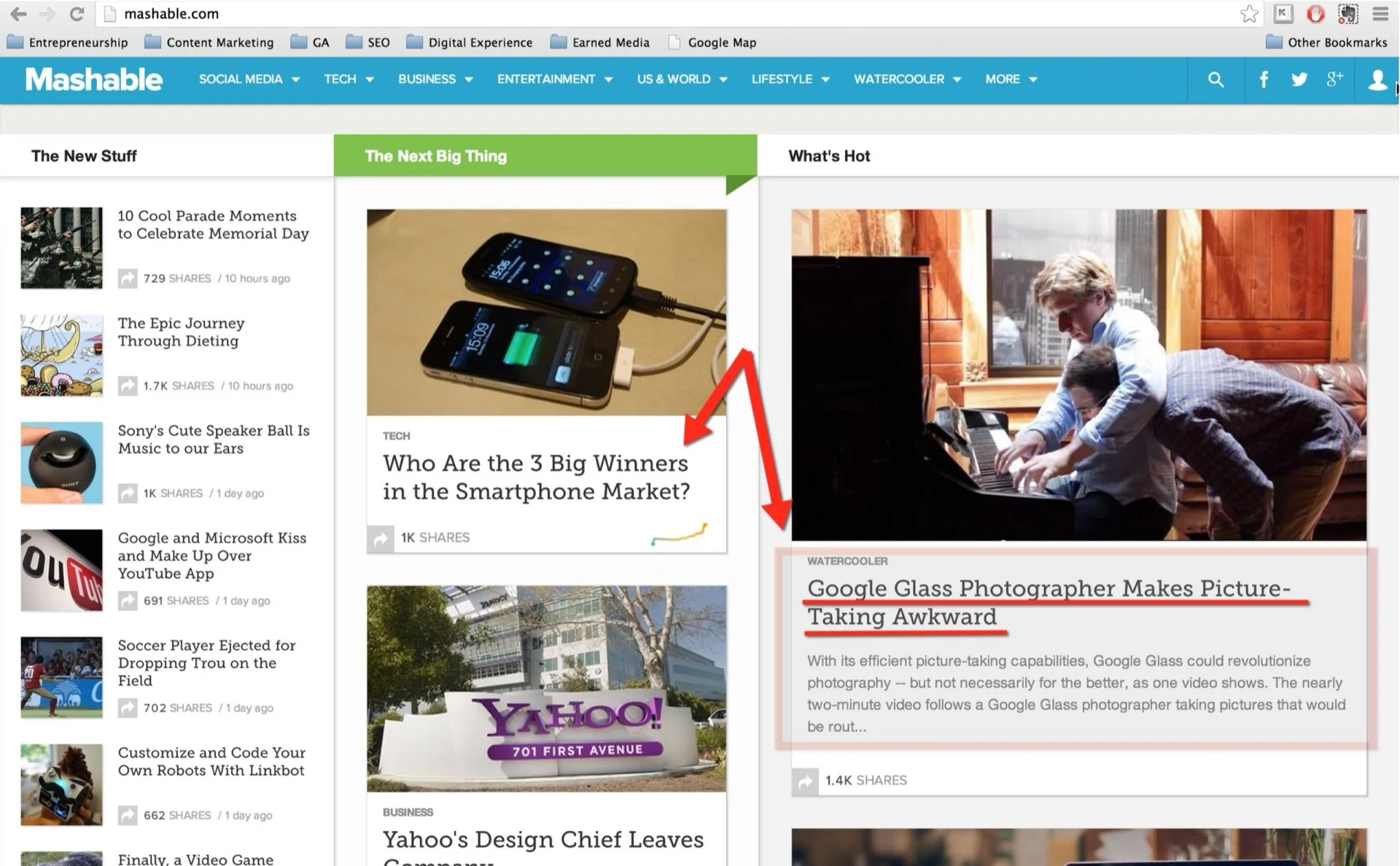 Desktop पर article title 2 lines में दिखता है। iPad screen size पर:
 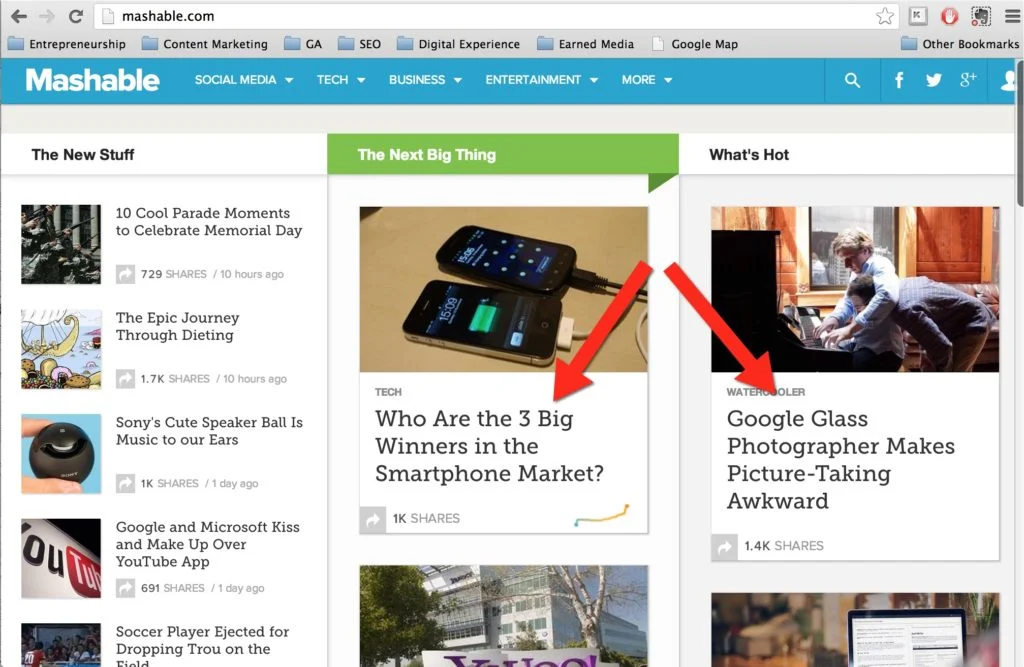 छोटी screen पर title 4 lines में आ जाता है, description के लिए जगह नहीं — लेकिन layout टूटता नहीं। Smartphone screen size:
 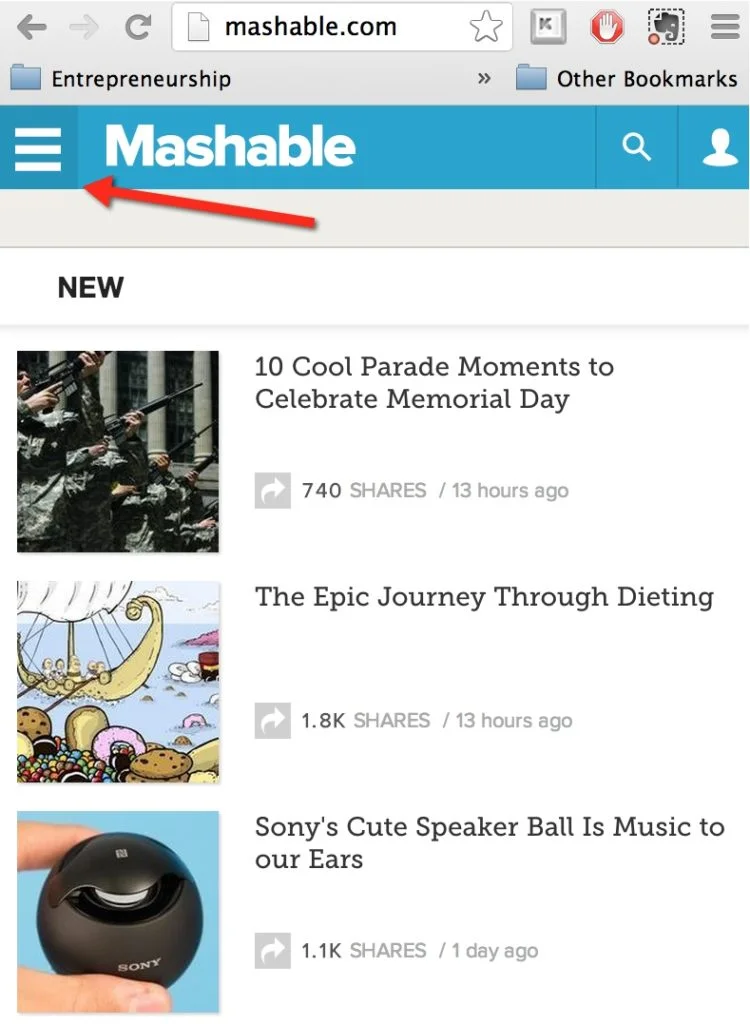 Layout पूरी तरह बदल जाता है — small screen के लिए customized।
Mobile Site: Same URL पर Different HTML Dynamically Serve करना
जब कोई customer आपकी website visit करे तो webserver detect कर सकता है कि वे किस device पर हैं और same URL पर एक custom page (HTML + CSS) present कर सकता है। यह mobile phones, tablets, desktop computers और Smart TVs के लिए design हो सकती है।
Separate Mobile URLs
यह option device type के आधार पर user experience customize करने के लिए एक separate mobile site build करना है। Browser detect करता है कि visitor mobile device पर है और उन्हें mobile-optimized version पर redirect करता है (जैसे m.vnexpress.net)। वियतनाम में VnExpress, Vietnamnet जैसे बड़े news portals इसी approach का use करते हैं (2013)। 
Mobile Friendly Site या Native Mobile App?
Budget की नज़र से: Separate mobile URLs सबसे कम budget में होती है। Responsive Web Design generally ज़्यादा expensive है। और native apps बनाना mobile site से कहीं ज़्यादा expensive है — मेरा estimate है कि functionality के आधार पर 3-20 गुना तक ज़्यादा।
Mobile site के advantages: कम cost, broader reach, cross-platform compatibility, Google search से easily discoverable।
Responsive Web Design inherits ये सभी advantages, plus अलग-अलग devices पर much better user experience।
Both "normal" mobile site और RWD के बड़े disadvantages:
- बिना internet connection के काम नहीं कर सकते (कुछ Web Apps में offline mode है)
- Phone का camera, calendar, photo stream, accelerometer access नहीं कर सकते
- Generally native app जैसा rich user experience नहीं — complicated animations, games, calculations आसान नहीं
- Push capabilities: mobile site background में run करके notifications नहीं भेज सकती
- Monetization की ease: Google Play और Apple App Store पर native app को market करना और monetize करना बहुत आसान है
Native app का एक बड़ा disadvantage: हर platform के लिए अलग version बनाना पड़ता है — iOS, Android। Development और maintenance cost दोनों ज़्यादा।
और ध्यान रखें — native app बनाने के बाद उसे promote करने और maintain करने में भी पैसा लगता है। सिर्फ 2 महीने के campaign के लिए app बनाकर बाद में support बंद करना — यह मैं recommend नहीं करूँगा।
Native App Development Flow
- Ideation: app concept और key functionalities। Long term benefits सोचें — campaign burst के लिए नहीं।
- Business analysis: requirements analyze करना, suitable technology solution और foundation framework suggest करना।
- Wireframe, Design: website की तरह wireframe critically important है। Screen flow explain करता है कि animation कैसे function करेगा और button touch करने पर क्या होगा।
- Database, CMS और API: database design करना, CMS और API code करना। PHP, Java या .Net — जो suitable लगे।
- Programming: front end को database, CMS और API से connect करना। iOS के लिए Objective C जैसी languages use होती हैं।
Android या iOS या Windows?
मुख्य बात है आपकी target audience में iOS और Android का market share। Windows clearly कम common है।
अगर budget हो तो दोनों के लिए बनाएं। अगर app से payment monetization करना हो तो iOS बेहतर है — Apple App Store users Android users की तुलना में payment करने के लिए ज़्यादा willing हैं।
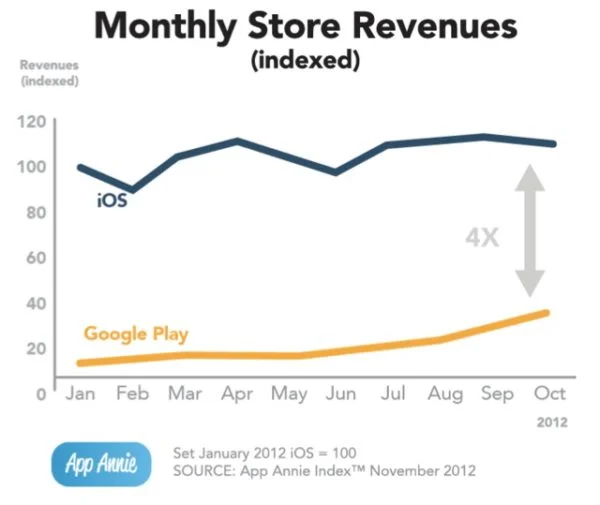
App Annie के data से पता चलता है कि iOS Store revenue monthly basis पर Google Play से लगभग 4 गुना ज़्यादा है।
अगर एक ही platform choose करनी हो तो यह पूरी तरह आपकी target audience और उनके smartphone choices पर depend करता है। Marketer के रूप में हमें अपने users को follow करना होता है — fish जहाँ fish हैं, वहाँ जाओ।
अंत में — यह "Mobile Asset" chapters से extract है मेरी latest किताब Vietnam Digital Marketing से। ebook खरीदने के लिए यह link use करें।