Chatbot v2.10 Unveiled: Enhanced Speed, Scalability और Simplicity के साथ User Experience को बेहतर बनाना
मैंने अपना chatbot FastAPI और async processing के साथ rebuild किया, response times कम किए और interface को simplify किया — यहाँ बताता हूँ कि targeted optimizations ने user experience को कैसे transform किया।
Update (2026): यह chatbot Sydney बन गया! Flask से FastAPI, FAISS से Weaviate से Supabase pgvector तक कई iterations के बाद, Sydney अब /ask/ पर रहती है और streaming responses के साथ Claude use करती है।
फरवरी 2024 की original post नीचे context के लिए preserved है।
दो हफ्ते पहले, मैंने अपने chatbot v2 की खबर share की थी, Langchain framework का उपयोग करते हुए, FAISS को vector store के रूप में। यह coding quicksand से महीनों के iterative work के बाद निकलने की raw story थी।
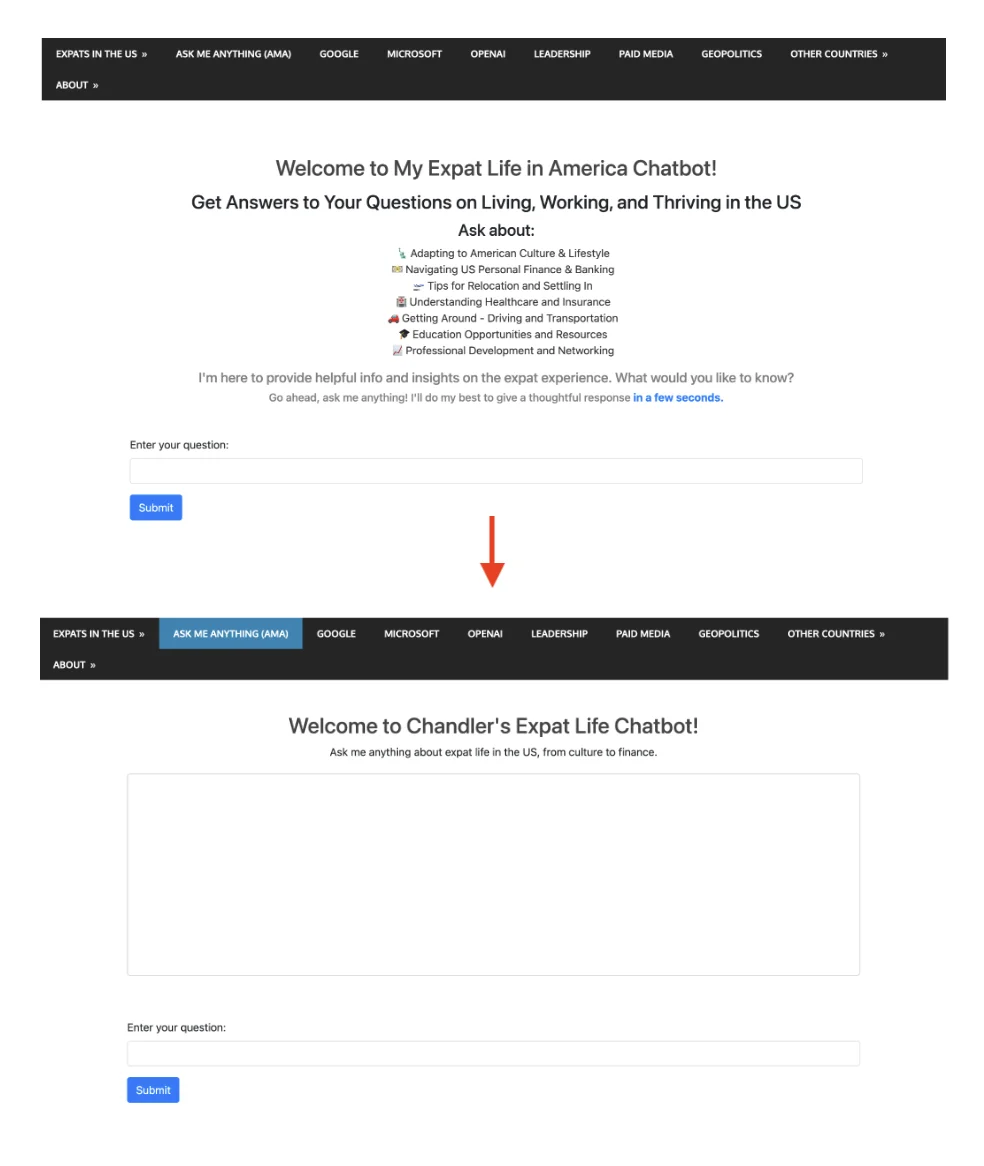
जबकि version 2 version 1 से एक significant improvement था, इसमें अभी भी बहुत सारी issues थीं जिनसे मैं खुश नहीं था। सबसे बड़ी शायद performance है; ज़्यादा precisely, यह बहुत slow है :P इसके अलावा, front-end interface बहुत complicated था जिसमें बहुत सारे introduction sentences थे इसलिए chat box screen पर बहुत नीचे था।
यह post highlight करेगी कि 2.10 ने targeted performance optimizations और UX improvements कैसे apply किए एक smoother, faster, और more capable conversational experience को unlock करने के लिए।
FastAPI की ओर Transition: Performance में एक Leap
v2.10 की enhanced performance की backbone FastAPI में हमारे shift में है। यह modern web framework न सिर्फ response times को accelerate करती है बल्कि एक more robust और scalable architecture भी introduce करती है।
v2 Flask framework
# Initialize Flask app and Langchain agent
app = Flask(__name__)
CORS(app, resources=\{r"/query_blog": {"origins": "https://www.chandlernguyen.com"\}})
app.debug = False
limiter = Limiter(app=app, key_func=get_remote_address)
Flask ने हमारी अच्छी service की, simplicity और flexibility provide करते हुए। हालाँकि, जैसे-जैसे हमारा user base बढ़ा, एक more performant solution की ज़रूरत स्पष्ट हो गई।
v2.1 FastAPI framework
# FastAPI with advanced CORS and async support
app = FastAPI()

origins = ["https://www.chandlernguyen.com"]

app.add_middleware(
    CORSMiddleware,
    allow_origins=origins,
    allow_credentials=True,
    allow_methods=["POST"],
    allow_headers=["Content-Type"],
)
FastAPI asynchronous support के ज़रिए performance enhance करती है।
Asynchronous Processing: Smoother Conversations
FastAPI की asynchronous features का leverage करते हुए, v2 non-blocking request handling introduce करता है, जो smoother और more dynamic user interactions की अनुमति देता है।
async def is_flagged_by_moderation(content: str) -> bool:
    openai_api_key = os.getenv('OPENAI_API_KEY')
    if not openai_api_key:
        logging.error("OPENAI_API_KEY not set in environment variables")
        raise HTTPException(status_code=500, detail="Server configuration error")

    headers = \{"Authorization": f"Bearer {openai_api_key\}"}
    data = \{"input": content\}

    async with httpx.AsyncClient() as client:
        response = await client.post("https://api.openai.com/v1/moderations", json=data, headers=headers)

    if response.status_code == 200:
        response_json = response.json()
        return any(result.get("flagged", False) for result in response_json.get("results", []))
    else:
        logging.error(f"Moderation API error: {response.status_code} - {response.text}")
        return False
User Interface Enhancements
v2.10 का front end visual appeal और user engagement को enhance करने के लिए redesign किया गया है। Accessibility और user experience पर focus के साथ, नया design simpler और more intuitive है।
Excessive introductory content का Reduction
यह chunk of text अब gone है।
<div class="container mt-5">
  <h2 style="color: #454545; text-align: center;">Welcome to My Expat Life in America Chatbot!</h2>
  ...
</div>
यह है replacement
<h2 style="color: #454545; text-align: center;">Welcome to Chandler's Expat Life Chatbot!</h2>
    <p style="text-align: center; margin-bottom: 20px;">Ask me anything about expat life in the US, from culture to finance.</p>
Visually, यह change ऐसा दिखता है
White space कम करने और layout improve करने के लिए Additional styles
<style>
        body, html \{
            height: 100%;
            margin: 0;
            display: flex;
            flex-direction: column;
        \}
        .container \{
            flex-grow: 1;
            display: flex;
            flex-direction: column;
            justify-content: center;
        \}
        #conversation \{
            height: 300px;
            overflow-y: auto;
            border: 1px solid #ccc;
            padding: 10px;
            border-radius: 5px;
        \}
    </style>
Performance monitoring के लिए Langsmith का Leverage
इस version 2.10 के साथ, मैं langsmith का उपयोग कर रहा हूँ। Setup काफी easy है और dashboard interface intuitive है।
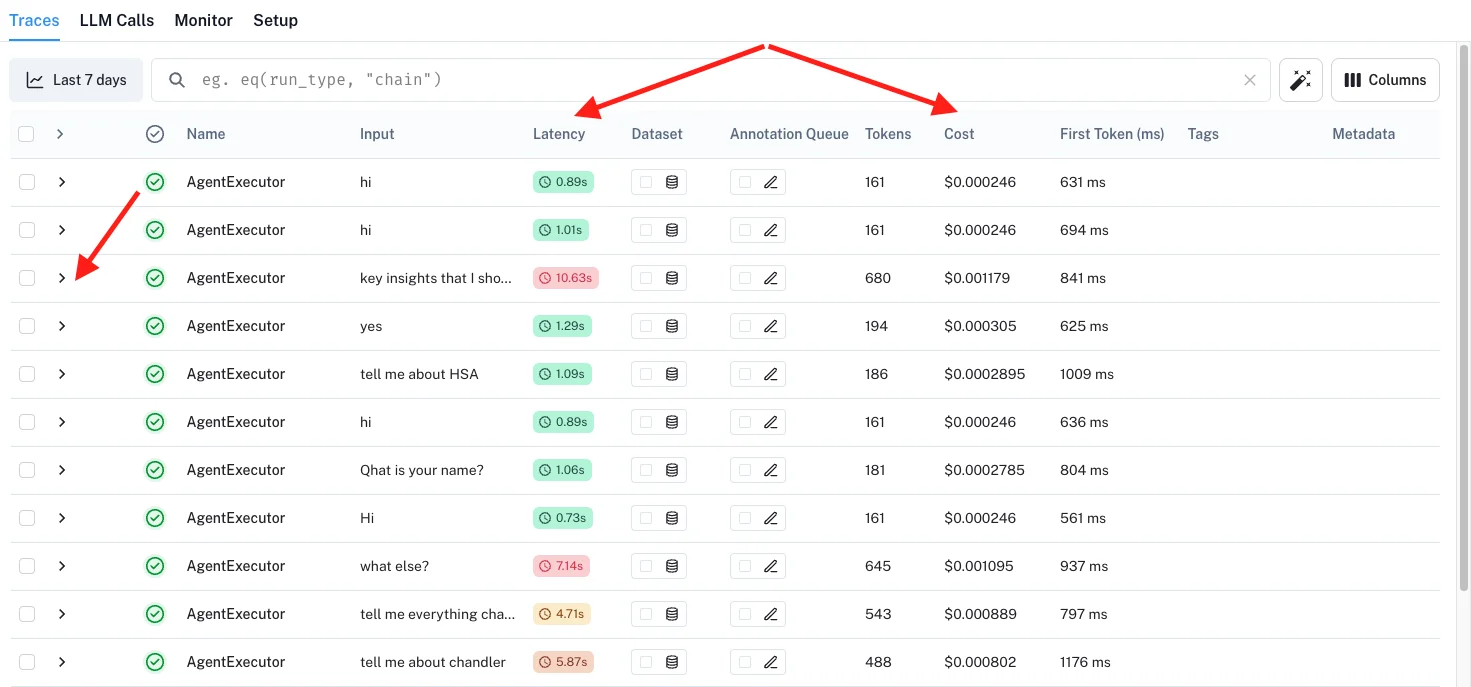
और जब भी मैं notice करता हूँ कि कोई query बहुत time ले रही है, मैं उस पर "click" कर सकता हूँ और exactly समझ सकता हूँ कि journey के किस part में issue है।
Version 2.1 का full back-end code
Per usual, मैंने full back-end code GitHub पर यहाँ share किया है।
मैं आपको chatbot को try करने के लिए invite करता हूँ :D इससे कुछ भी पूछें जो मैंने पिछले 16 सालों में लिखा है।
क्या आपने कभी chatbot बनाने या frameworks के बीच migrate करने की कोशिश की है? मुझे बताएं कि आपके लिए कौन से performance tricks काम आए।
शुभकामनाओं सहित, Chandler