Chatbot v2.10 Inilabas: Pag-angat ng User Experience gamit ang Enhanced Speed, Scalability, at Simplicity
Binuo kong muli ang aking chatbot gamit ang FastAPI at async processing, pinutol ang response times habang pinapasimple ang interface — ito kung paano binago ng mga targeted optimizations ang user experience.
Update (2026): Ang chatbot na ito ay naging Sydney! Pagkatapos ng maraming iterations — Flask papuntang FastAPI, FAISS papuntang Weaviate papuntang Supabase pgvector — si Sydney ay nasa /ask/ na ngayon at gumagamit ng Claude na may streaming responses. Ang mga FastAPI pattern sa ibaba ay isang stepping stone sa kung nasaan kami ngayon.
Orihinal na post mula Feb 2024 na napreserba sa ibaba para sa context.
Dalawang linggo na ang nakakaraan, ibinahagi ko ang balita tungkol sa aking chatbot v2, na gumagamit ng Langchain framework, kasama ang FAISS bilang vector store. Ito ay isang raw na kwento kung paano ako nakaahon mula sa coding quicksand pagkatapos ng ilang buwan ng iterative work.
Habang ang version 2 ay isang malaking improvement mula sa version 1, marami pa rin itong isyu na hindi ako masaya. Ang pinakamalaki siguro ay performance; mas tiyak, masyado itong mabagal :P Gayundin, ang front-end interface ay masyadong komplikado na may napakaraming introduction sentences kaya ang chat box ay masyado nang mababa sa screen.
Ang post na ito ay magha-highlight kung paano inaapply ng 2.10 ang mga targeted performance optimizations at UX improvements para mag-unlock ng mas maayos, mas mabilis, at mas may kakayahang conversational experience.
Paglipat sa FastAPI: Isang Leap sa Performance
Ang backbone ng enhanced performance ng v2.10 ay ang aming shift sa FastAPI. Ang modernong web framework na ito ay hindi lang nagpapabilis ng response times kundi nagpapakilala rin ng mas robust at scalable architecture.
v2 Flask framework
# Initialize Flask app and Langchain agent
app = Flask(__name__)
CORS(app, resources=\{r"/query_blog": {"origins": "https://www.chandlernguyen.com"\}})
app.debug = False
limiter = Limiter(app=app, key_func=get_remote_address)
Magandang nagserbisyo sa amin ang Flask, nagbigay ng simplicity at flexibility. Gayunpaman, habang lumalaki ang user base namin, naging malinaw ang pangangailangan para sa mas performant na solusyon.
v2.1 FastAPI framework
# FastAPI with advanced CORS and async support
# Initialize FastAPI app
app = FastAPI()

# Configure CORS for production, allowing only your frontend domain
origins = ["https://www.chandlernguyen.com"]

app.add_middleware(
    CORSMiddleware,
    allow_origins=origins,
    # allow_origins=["*"],
    allow_credentials=True,
    allow_methods=["POST"],
    allow_headers=["Content-Type"],
)
Pinapahusay ng FastAPI ang performance sa pamamagitan ng asynchronous support.
Asynchronous Processing: Mas Maayos na mga Usapan
Gamit ang asynchronous features ng FastAPI, nagpapakilala ang v2 ng non-blocking request handling, na nagbibigay-daan sa mas maayos at mas dynamic na user interactions. Isang halimbawa ang nasa ibaba.
# Function to check content with OpenAI Moderation API (sensitive keys are loaded from environment variables)
async def is_flagged_by_moderation(content: str) -> bool:
    openai_api_key = os.getenv('OPENAI_API_KEY')
    if not openai_api_key:
        logging.error("OPENAI_API_KEY not set in environment variables")
        raise HTTPException(status_code=500, detail="Server configuration error")

    headers = \{"Authorization": f"Bearer {openai_api_key\}"}
    data = \{"input": content\}

    async with httpx.AsyncClient() as client:
        response = await client.post("https://api.openai.com/v1/moderations", json=data, headers=headers)

    if response.status_code == 200:
        response_json = response.json()
        return any(result.get("flagged", False) for result in response_json.get("results", []))
    else:
        logging.error(f"Moderation API error: {response.status_code} - {response.text}")
        return False
Mga Pagpapabuti sa User Interface
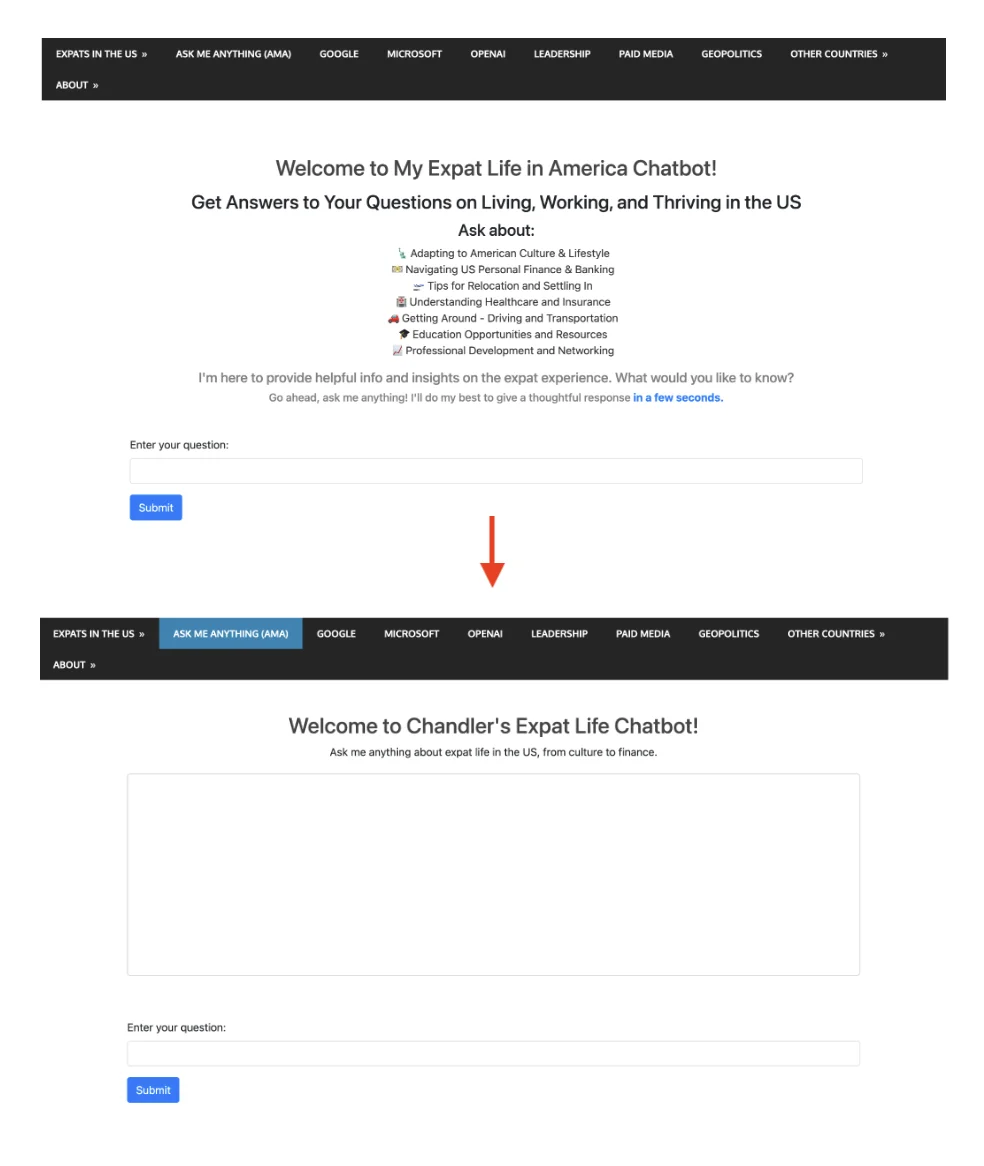
Ang front end ng v2.10 ay na-redesign para mapahusay ang visual appeal at user engagement. Sa focus sa accessibility at user experience, ang bagong disenyo ay mas simple at mas intuitive.
Pagbawas ng sobrang introductory content
Ang chunk ng text na ito ay nawala na ngayon.
<div class="container mt-5">
  <h2 style="color: #454545; text-align: center;">Welcome to My Expat Life in America Chatbot!</h2>
  <h3 style="margin-top: 15px; text-align: center;">
    Get Answers to Your Questions on Living, Working, and Thriving in the US
  </h3>
  <h4 style="margin-top: 10px; text-align: center;">Ask about:</h4>
  <ul style="list-style: none; text-align: center; color: #333;">
    <li>Adapting to American Culture & Lifestyle</li>
    <li>Navigating US Personal Finance & Banking</li>
    <li>Tips for Relocation and Settling In</li>
    <li>Understanding Healthcare and Insurance</li>
    <li>Getting Around - Driving and Transportation</li>
    <li>Education Opportunities and Resources</li>
    <li>Professional Development and Networking</li>
  </ul>
  <h5 style="margin-top: 10px; color: grey; text-align: center;">
    I'm here to provide helpful info and insights on the expat experience. What would you like to know?
  </h5>
  <h6 style="margin-top: 5px; color: grey; text-align: center;">
    Go ahead, ask me anything! I'll do my best to give a thoughtful response <span style="font-weight: bold; color: #007bff;">in a few seconds.</span>
  </h6>
Ito ang kapalit
<h2 style="color: #454545; text-align: center;">Welcome to Chandler's Expat Life Chatbot!</h2>
    <p style="text-align: center; margin-bottom: 20px;">Ask me anything about expat life in the US, from culture to finance.</p>
Visually, ganito ang itsura ng pagbabago
Karagdagang styles para mabawasan ang white space at mapabuti ang layout
<style>
        /* Additional styles to reduce white space and improve layout */
        body, html \{
            height: 100%;
            margin: 0;
            display: flex;
            flex-direction: column;
        \}
        .container \{
            flex-grow: 1;
            display: flex;
            flex-direction: column;
            justify-content: center; /* Center vertically in the available space */
        \}
        #conversation \{
            height: 300px; /* Adjust based on your preference */
            overflow-y: auto;
            border: 1px solid #ccc; /* Add border to conversation box */
            padding: 10px;
            border-radius: 5px; /* Optional: round corners */
        \}
    </style>
Ang #conversation box styling na may specified height at overflow control ay partikular na epektibo para sa pagpapanatili ng malinis at user-friendly na chat interface.
<!-- Area to display the conversation -->
    <div id="conversation" aria-live="polite" class="mb-5" style="height: 300px; overflow-y: auto;"></div>
Ang pagdagdag ng aria-live="polite" sa conversation div ay isang maalalahanin na karagdagan para sa mga screen reader users, na nagpapahintulot sa kanila na malaman ang mga dynamic content changes.
Auto-focus sa Input Field
Ang pagdagdag ng $('#user-query').focus(); sa dulo ng AJAX success at error callbacks ay isang user-friendly feature, na tinitiyak na ang input field ay awtomatikong naka-focus pagkatapos ng bawat message submission, para sa mas maayos na chat experience.
Paggamit ng Langsmith para sa performance monitoring at observability
Sa version 2.10 na ito, gumagamit ako ng langsmith. Medyo madali lang ang set up at sapat na intuitive ang dashboard interface.
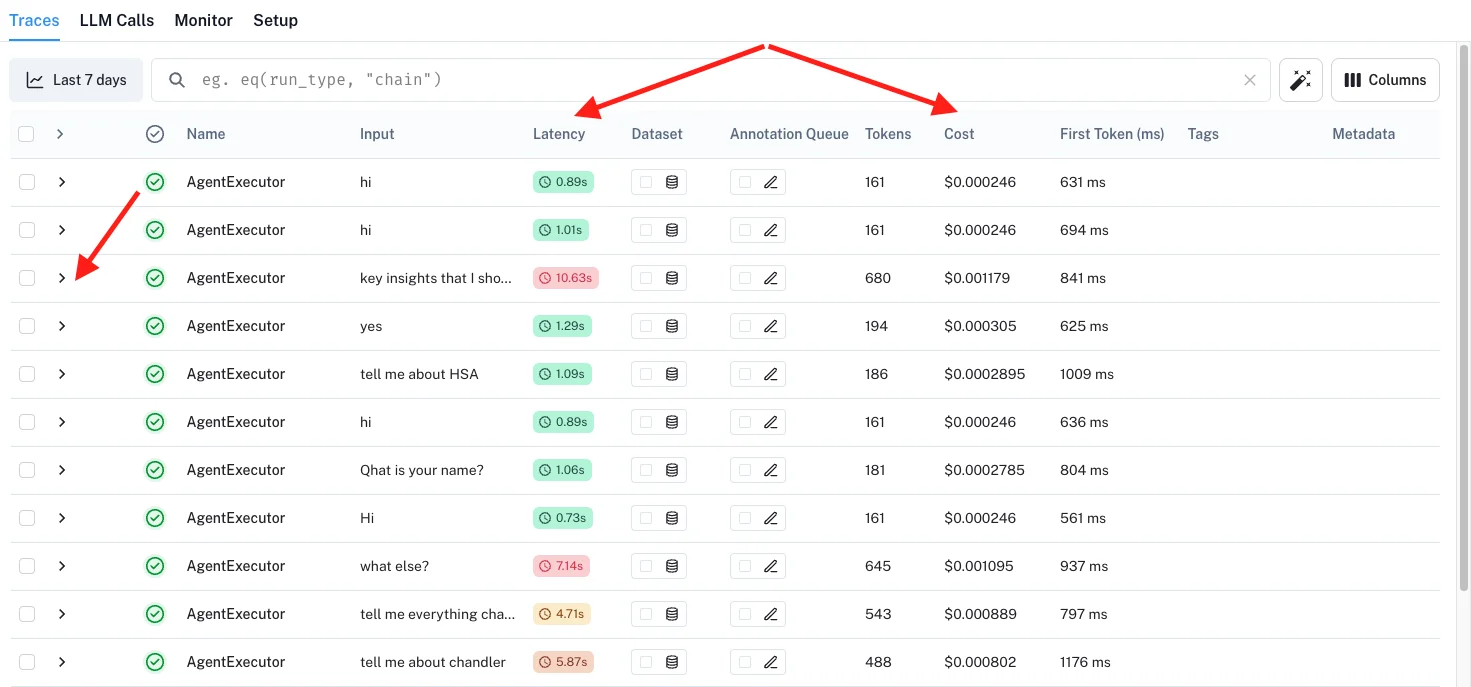
At kapag napansin ko na ang isang partikular na query ay tumatagal nang masyadong matagal, maaari ko itong "i-click" at mas maintindihan kung aling eksaktong parte ng journey ang may isyu.
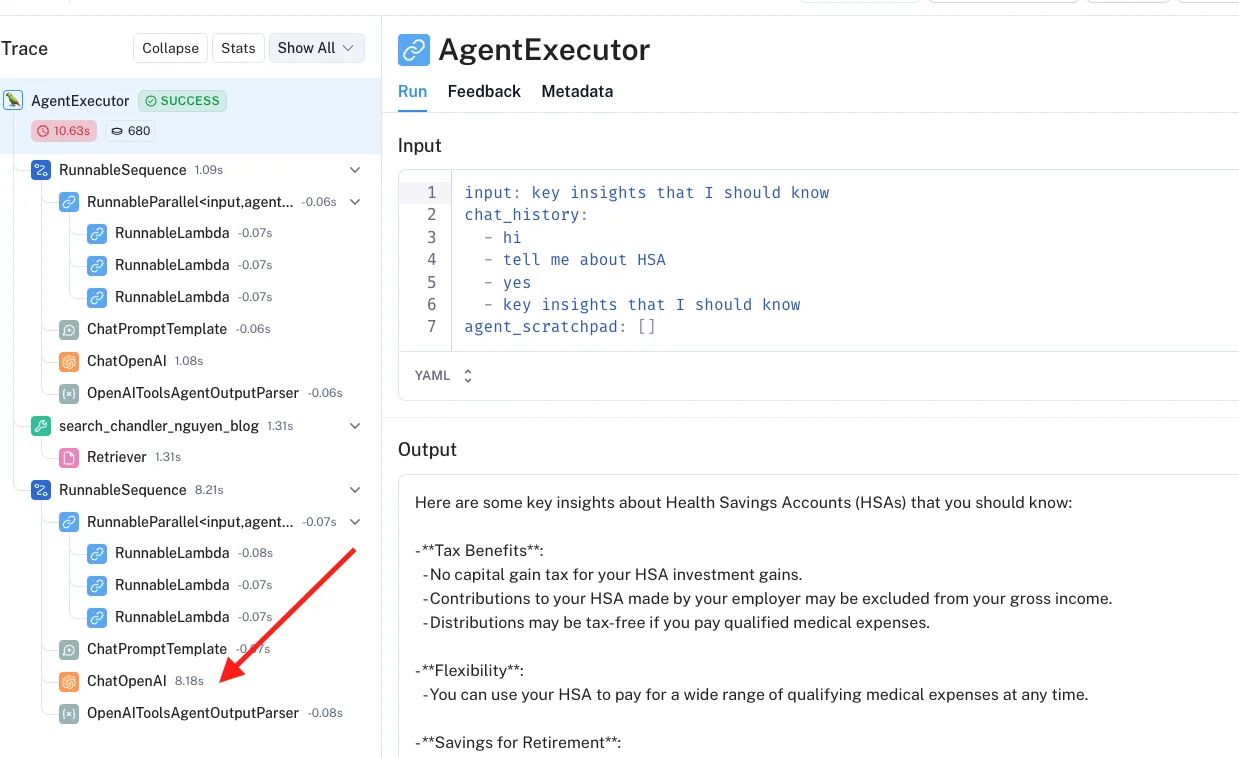
Ang buong back-end code para sa version 2.1
Gaya ng dati, ibinahagi ko ang buong back-end code sa GitHub dito. Nasa parehong repo ito tulad ng nakaraang version chatbot 2.0.
Inaanyayahan kitang subukan ang chatbot :D Magtanong ng kahit ano tungkol sa mga sinulat ko sa nakaraang 16 taon.
Nasubukan mo na bang bumuo ng chatbot o mag-migrate sa pagitan ng mga frameworks? Gusto kong marinig kung anong performance tricks ang gumana para sa iyo.
Maraming salamat,
Chandler