Marketing Teams一齊Work。而家STRATUM都係。
我喺alpha有少過50個users嘅時候就ship咗team collaboration features,因為我嘅customers已經喺team入面work——只係透過painful嘅screenshots同copy-paste workarounds,每年cost 80+個鐘。
「你仲喺alpha。點解你build team features?」
Fair question。我有少過50個users。大部分SaaS founders會laser-focused喺去到100個users先再諗teams。
但以下係我望住alpha users意識到嘅:佢哋唔係自己做。Marketing director喺度share screenshots俾佢嘅CEO。Agency owner喺度copy-paste AI outputs入WhatsApp俾佢啲friend。Founder喺度forward emails俾佢太太。
做咗18年advertising,呢個唔應該surprise我。Marketing 永遠 唔係solo activity。我睇住過成層agency floor透過Slack threads、email forwards、同「can you screenshot that for me?」requests嘅chaotic mix嚟operate。呢個就係teams actually collaborate嘅方式——而佢好painful。所以當我喺alpha見到同樣嘅patterns,我知我唔可以ignore。
所以我build咗team collaboration。喺Alpha。當「更醒」嘅founders會等。:P
以下係我ship咗咩、點解我咁build、同埋沿途學到咩:
1. Right Access for Everyone — 15個roles根據SME同Agency teams actually嘅工作方式設計,agencies有client-level isolation
2. 一齊Work唔使Back-and-Forth — Approvals、comments、tasks、同notifications取代你啲「did you see my message?」Slack threads
3. New Hires即刻Productive — Invite → assign role → 佢哋開始做嘢。30秒,唔係3日。
以下係ship咗咩、點解佢對你team重要、同令佢work嘅decisions。
---
「Just Share Your Login」嘅Real Cost
喺有呢啲features之前,以下係teams點用STRATUM:
Option A:Share credentials(security nightmare)
- 所有人用同一個login
- 唔知邊個做咗咩
- 一個人改password,全部人被lock out
Option B:Separate accounts(貴同fragmented)
- 每個人分別付錢
- AI outputs住喺唔同accounts
- 「你可唔可以export嗰個strategy send俾我?」
Option C:Screenshot同paste(reality)
- 一個人run AI agents
- Screenshots或copy-pastes俾teammates
- Context lost,formatting break,冇人可以build on the work
呢啲都唔係real collaboration。佢哋係workarounds。
Business cost? 我望住一個agency owner每日花20分鐘just moving AI outputs between tools——forward emails、喺Google Docs reformat、re-explain context俾睇唔到original conversation嘅teammates。
嗰個係每年80+個鐘。一個人。一個team。
---
Feature 1:俾Every Person Right Access——唔使IT Headache
做咗18年agency side,我知exactly marketing teams點work:唔同嘅人需要唔同access到唔同嘅嘢。
你嘅senior strategist做Client A同Client B。你嘅junior analyst喺smaller accounts學緊。你嘅freelance creative只掂佢哋被assign到嘅clients。絕對冇人應該見到佢哋唔應該見嘅client data。
呢個唔止係cost control(雖然呢個都important)。呢個係teams actually operate嘅方式。
兩個Permission Models:SME vs Agency
我幾早就學到一個3人startup同一個15人agency有完全唔同嘅workflows。Try逼佢哋入一個permission model會係mess——我見過enterprise tools做呢個,結果always係small teams drowning in complexity而large teams冇enough control。所以我build咗兩個distinct models。
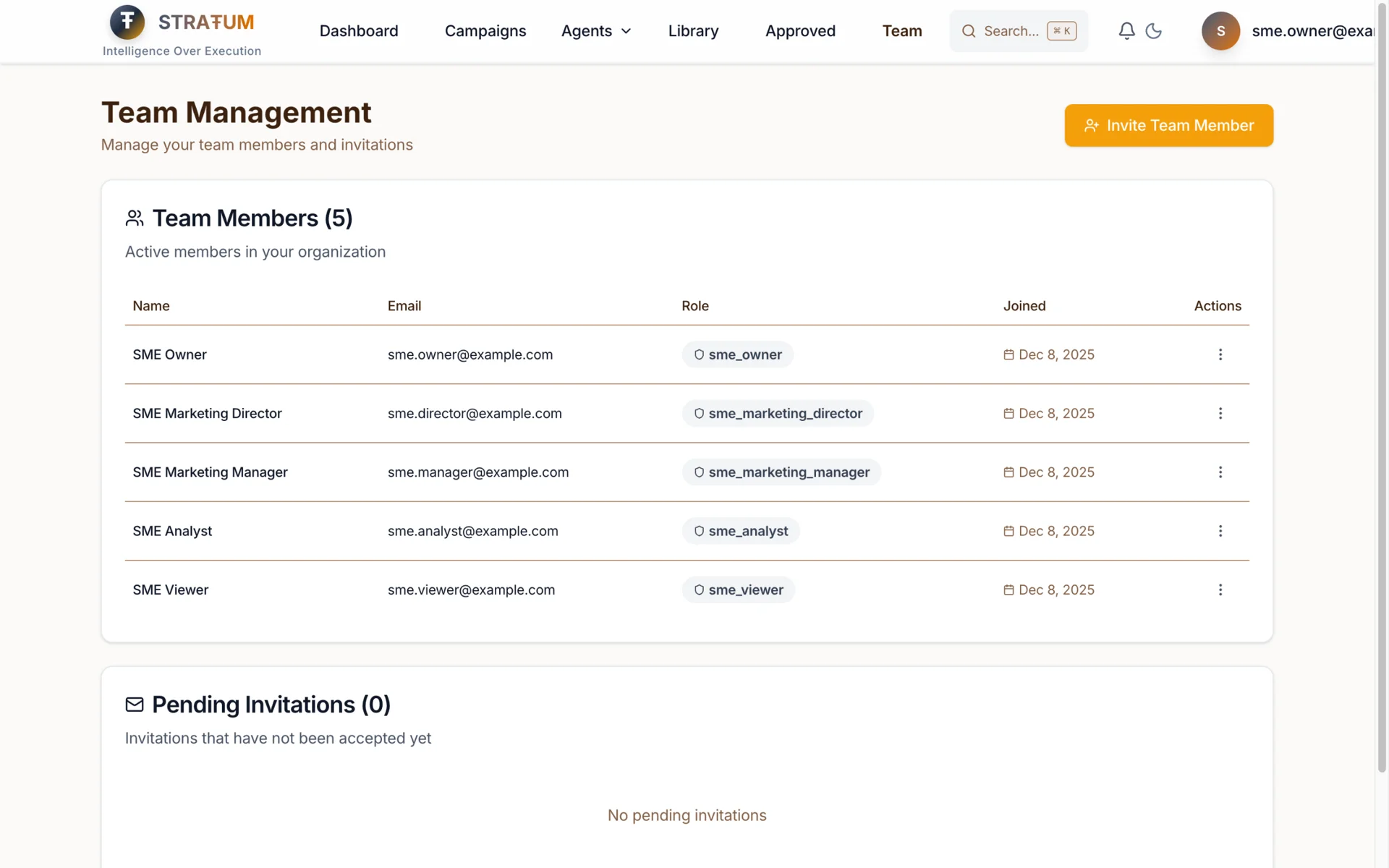
SME Roles(5個Roles)
For有simpler hierarchies嘅small-to-medium businesses:
| Role | Agent Access | Campaign Access | Team Management |
|------|-------------|-----------------|-----------------|
| Owner | All 8 agents | Full access (create, edit, run, archive) | Invite, manage, remove |
| Marketing Director | Strategy, Persona, Content, Quick Wins (4) | Create, edit, run campaigns | View team only |
| Marketing Manager | Execution, Content, Quick Wins (3) | Create, edit, run campaigns | None |
| Analyst | Performance Intelligence (1) | View only | None |
| Viewer | None (read-only) | View only | None |
點解呢五個? 我map咗我喺SME marketing teams見到嘅actual roles。Owner乜都做。Director set strategy。Manager execute。Analyst measure。VA或bookkeeper只需要睇到發生緊咩。
Agency Roles(10個Roles)
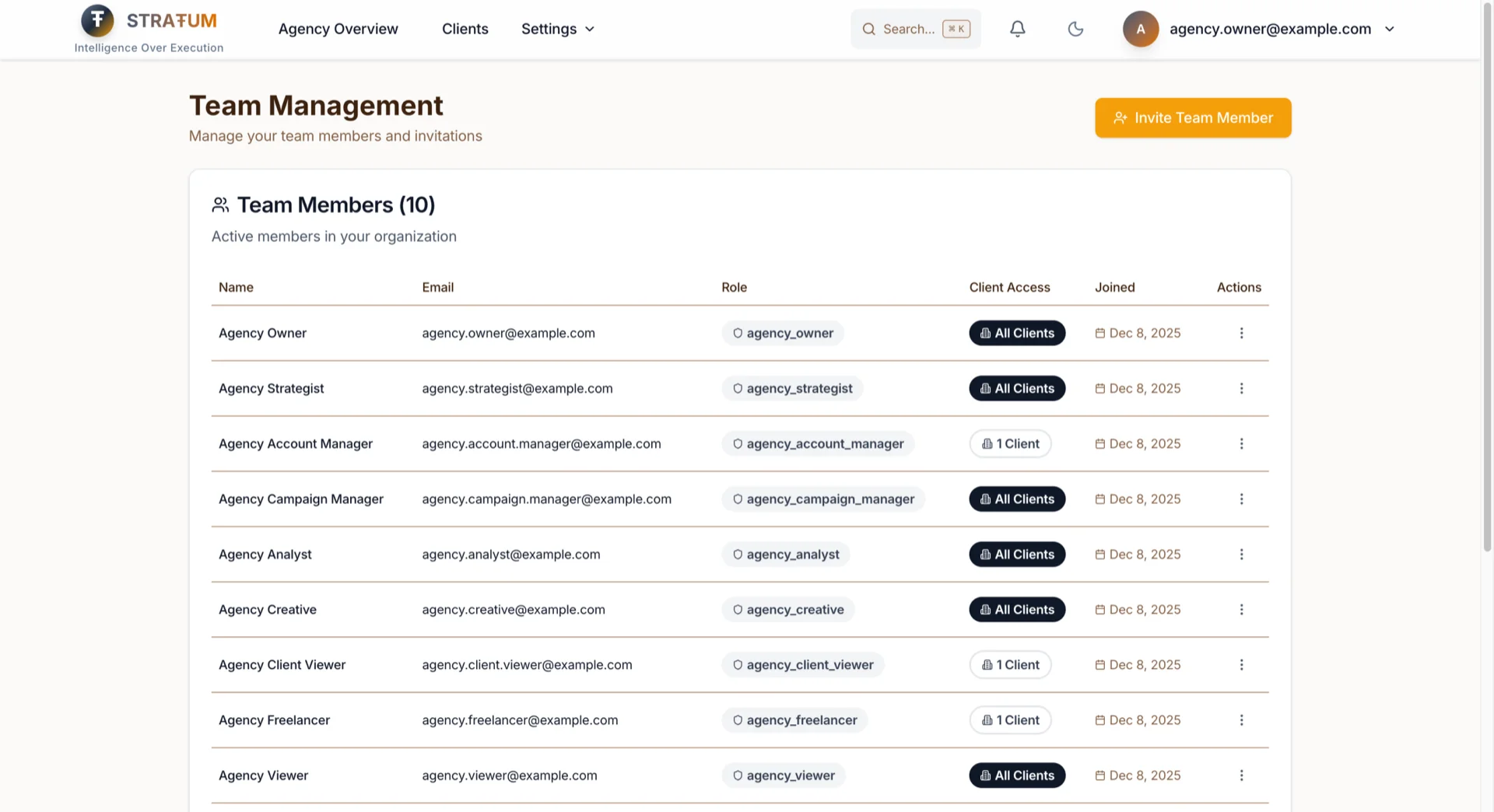
For manage多個clients有complex team structures嘅agencies:
| Role | Agent Access | Client Scope | Key Permissions |
|------|-------------|--------------|-----------------|
| Owner | All 9 agents | All clients | Full control, billing |
| Admin | All 9 agents | All clients | Team management, no billing |
| Strategist | 8 agents (no Client Success) | All clients | Strategy, campaigns |
| Account Manager | All 9 agents | Assigned only* | Full access for their clients |
| Campaign Manager | Quick Start, Content, Campaign (3) | All clients | Execution focus |
| Analyst | Performance Intelligence (1) | All clients | Analytics, exports |
| Creative | Content (1) | All clients | Content creation only |
| Client Viewer | None | Assigned only* | Read-only for clients |
| Freelancer | Content (1) | Assigned only* | Limited scope, temporary |
| Viewer | None | All clients | Read-only everywhere |
Client-scoped roles
係agencies嘅game-changer。當你assign一個Account Manager去Client A,佢literally睇唔到Client B嘅data。唔係「hidden in the UI」——係喺database level enforce。
Client Assignment Management
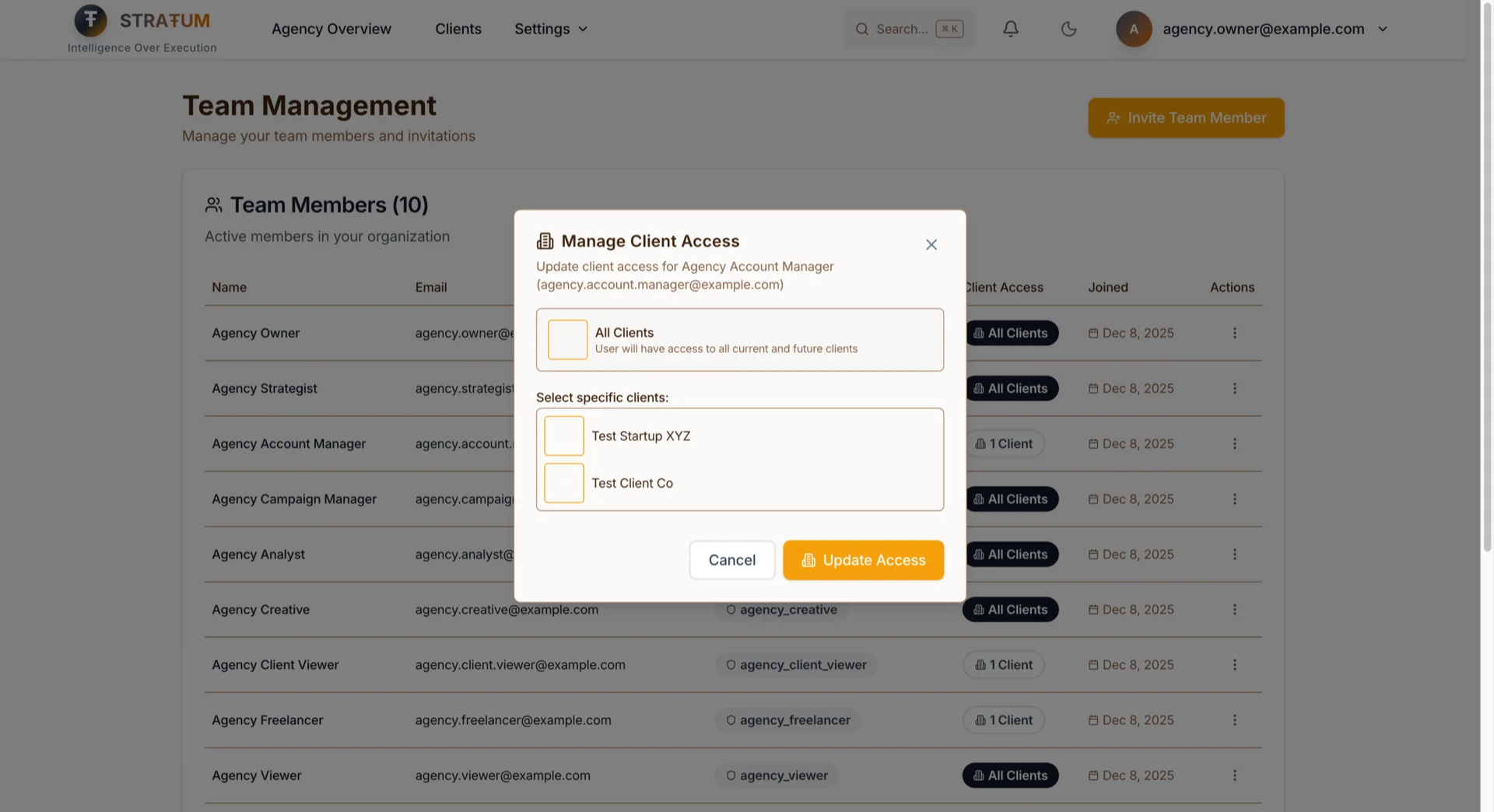
For agency teams,Team Management page而家顯示一個Client Access column,一眼就知每個team member可以access邊啲clients。㩒任何team member嘅actions menu嚟:
- Grant「All Clients」access: 新clients自動對佢哋visible
- Assign specific clients: 揀exactly邊啲clients佢哋應該見到
- 隨時update assignments: 隨住你嘅client roster演變更改access
呢個代表你嘅Client A Account Manager literally睇唔到Client B嘅dashboard、campaigns、或AI outputs——即使佢哋try。Filtering發生喺database level,唔只係UI。
For onboarding new team members: 當你invite某人,你喺同一個flow揀佢哋嘅role同client scope。冇separate steps。唔會忘記restrict access。
Permission-Aware UI
以下係令呢個actually usable嘅嘢:UI根據你嘅role adapt。
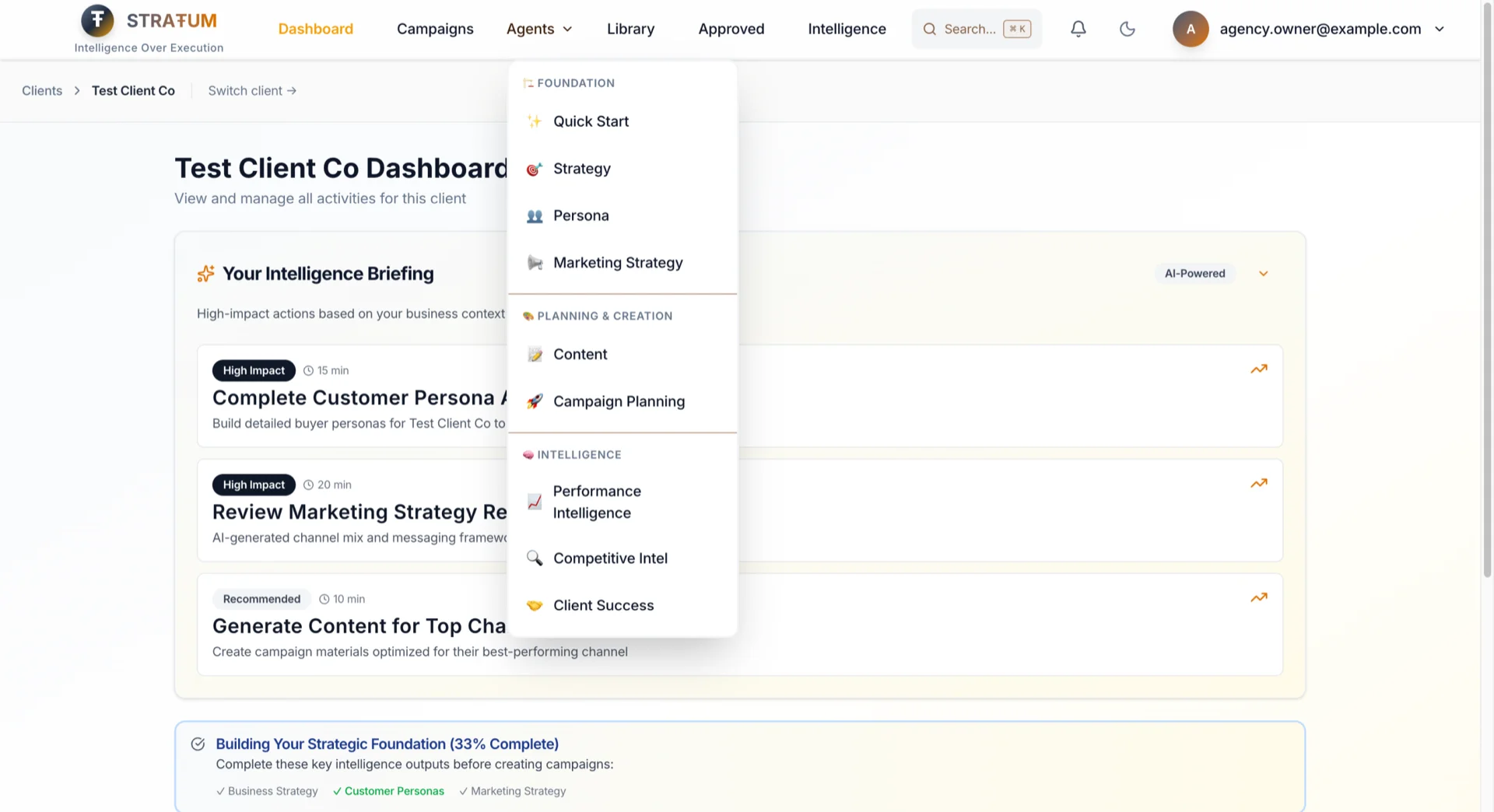
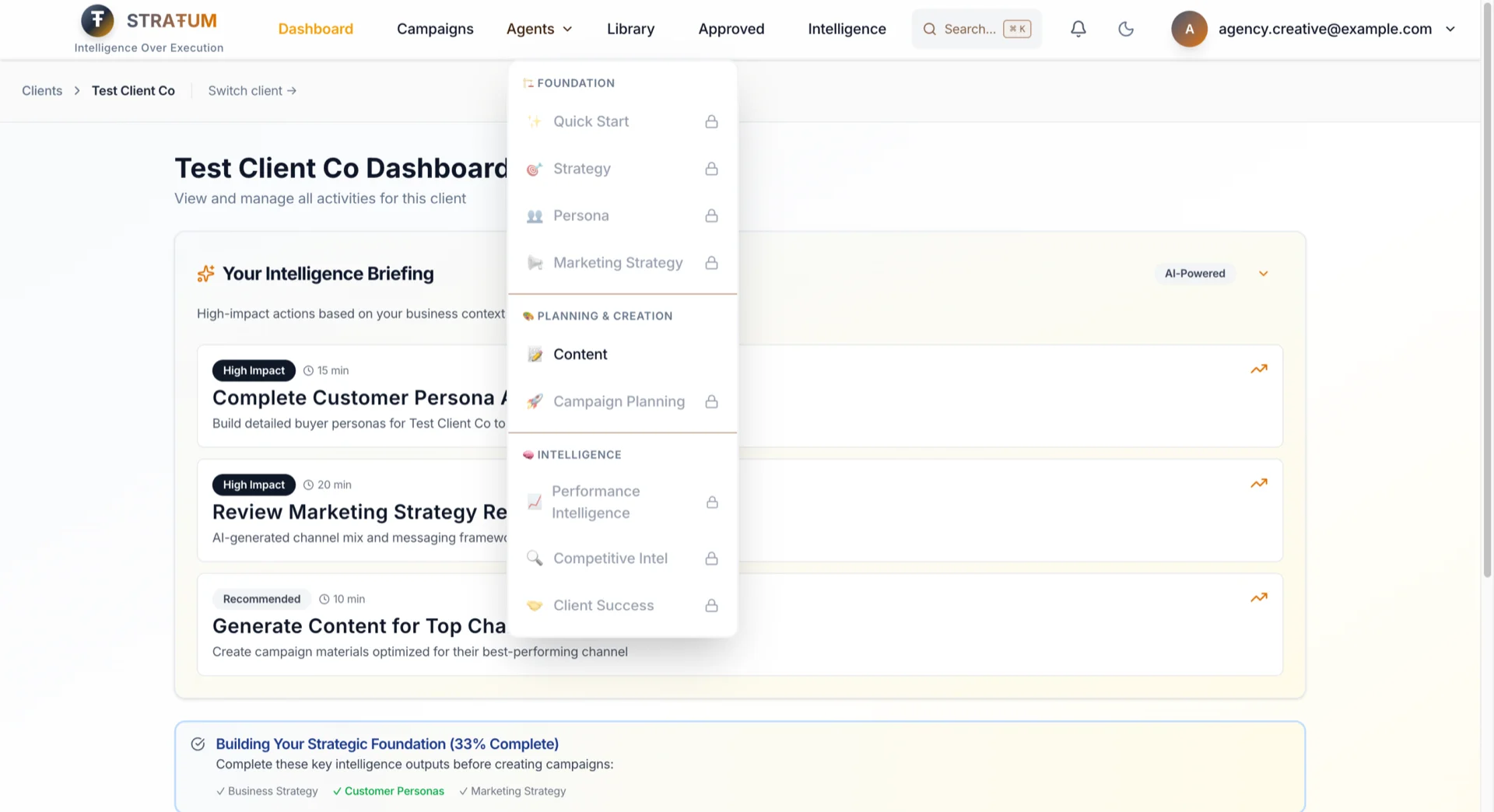
如果你唔可以invite team members,你唔會見到Team settings。如果你唔可以access一個client,嗰個client唔會出現喺你dashboard。如果你唔可以run一個agent,佢會顯示locked有clear indicator。
唔會再㩒options然後得到error。唔會再「點解我見到呢個但做唔到嘢?」嘅confusion。
For Agency Directors: 你嘅creatives見到clean、focused嘅interface——只有佢哋嘅tools。Less training,fewer mistakes。
For Founders: 你嘅viewer-role VA見到simplified dashboard。佢哋可以搵到同copy佢哋需要嘅嘢而唔會overwhelmed。
37個Granular Permissions(你唔需要掂)
呢啲roles背後有37個individual permissions——但你永遠唔需要手動configure佢哋。每個role根據marketing teams actually嘅工作方式pre-configured:
| Category | Why It Matters |
|----------|----------------|
| AI Agents (9) | 你嘅Creative唔會accidentally喺錯嘅client run Strategy agent |
| Campaigns (6) | Analysts可以view campaigns嚟report,但唔會accidentally archive一個 |
| Clients (5) | 只有Owners同Admins可以加新clients——冇accidental data sprawl |
| Analytics (3) | 所有人可以睇basic stats;只有analysts可以export raw data |
| Documents (3) | Protect sensitive uploads——VAs可以view但唔可以delete |
| Organization (4) | Billing access限於Owners——冇「邊個改咗我哋plan?」嘅surprises |
| Team (3) | Managers唔可以冇Owner approval就invite佢哋嘅friends |
| Workspace (2) | Keep workspaces organized而唔係人人都create新嘅 |
| Admin (2) | System functions reserved俾知自己做緊咩嘅人 |
每個role得到exactly佢哋做job需要嘅——唔多唔少。你set role一次;permissions自動follow。
---
Feature 2:停止Chase Screenshots同Slack Threads
呢個係我最personally invested嘅feature。Permissions control 邊個可以做咩,但collaboration係關於_佢哋點一齊work_——由我經驗嚟講,back-and-forth先係actually食你一日嘅嘢。我live咗呢個problem二十年喺agency side :D
Shared Campaigns & AI Outputs
舊model: 你嘅campaigns。你嘅AI outputs。你嘅silo。
新model: Organization-scoped collaboration。
當你嘅strategist run Persona Agent,嗰個persona屬於organization——唔係佢哋personal account。而家你嘅copywriter可以:
- 唔使問screenshot就見到persona
- Run Content Agent嘅時候reference佢
- Build on佢而唔係由scratch開始
當你嘅analyst generate一個competitive analysis,你嘅Marketing Director可以直接review——唔使透過forwarded PDF。
Approval Workflows
Content唔止係create——佢被review同approved先go live。
| Workflow | Requester | Approver(s) | Use Case |
|----------|-----------|-------------|----------|
| SME Campaign Launch | Manager | Director → Owner | Two-level approval for campaigns |
| SME Content Publish | Manager | Director | Single approval for content |
| Agency Campaign Launch | Campaign Manager | Strategist → Owner | Two-level for client work |
| Agency Content (Client) | Creative | Account Manager | Client-scoped approval |
| Freelancer Work | Freelancer | Account Manager | External contributor review |
點運作:
1. Creative完成一篇content → 㩒「Request Approval」
2. Account Manager收到notification → 喺context入面review
3. Approve、reject、或request changes有notes
4. Creative收到decision嘅notification
5. 如果request changes → revise同resubmit(round tracking)
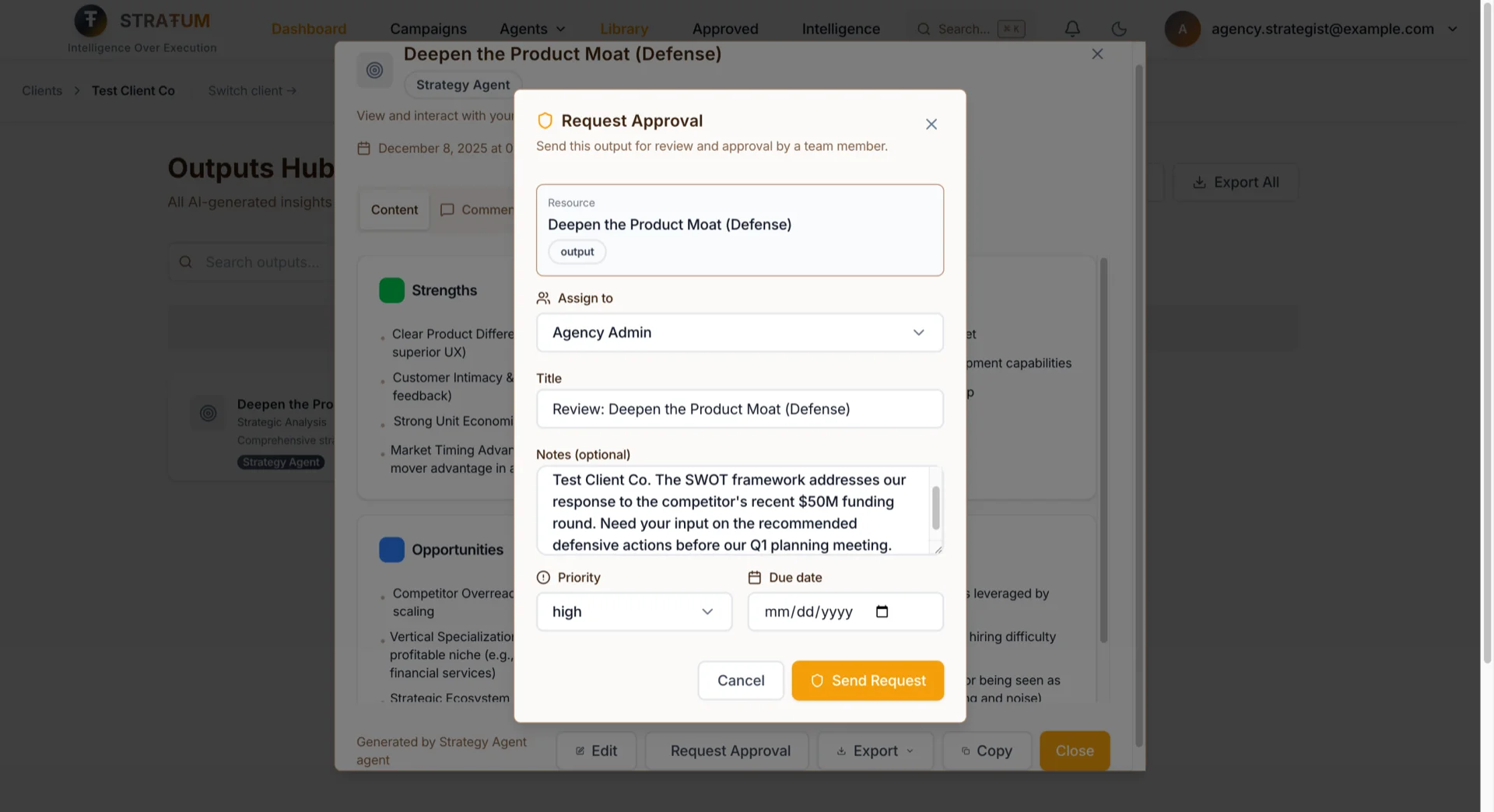
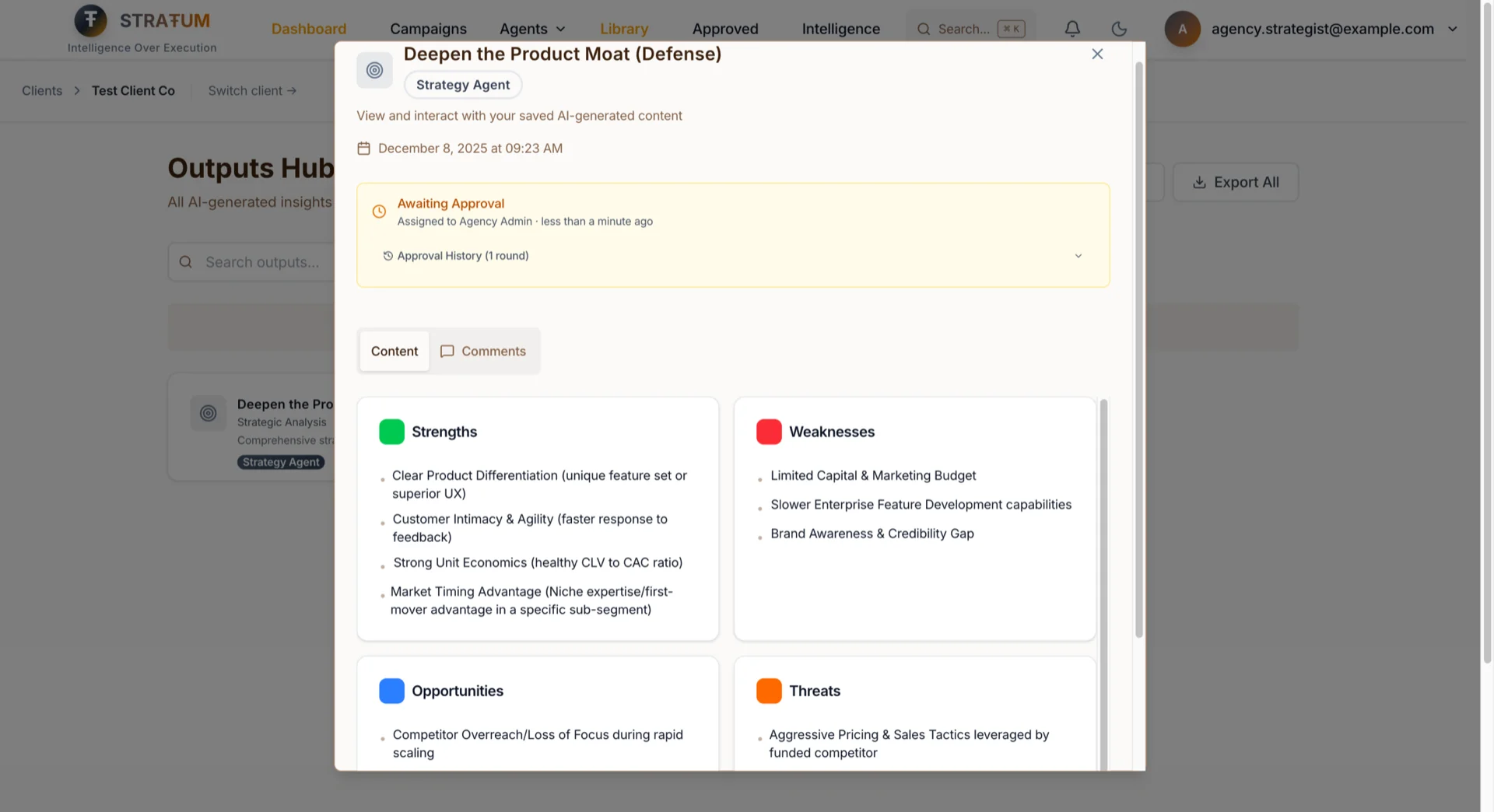
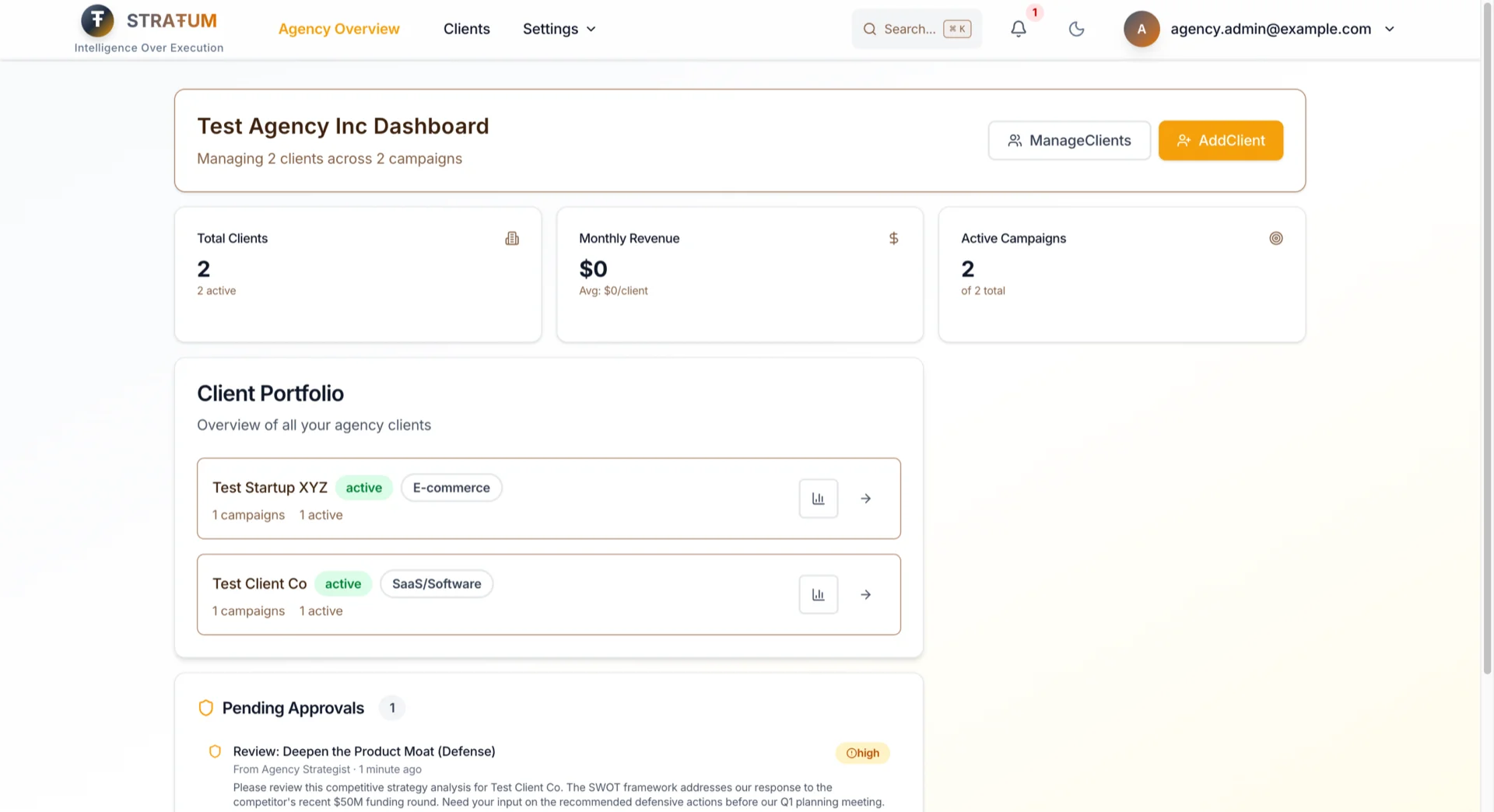
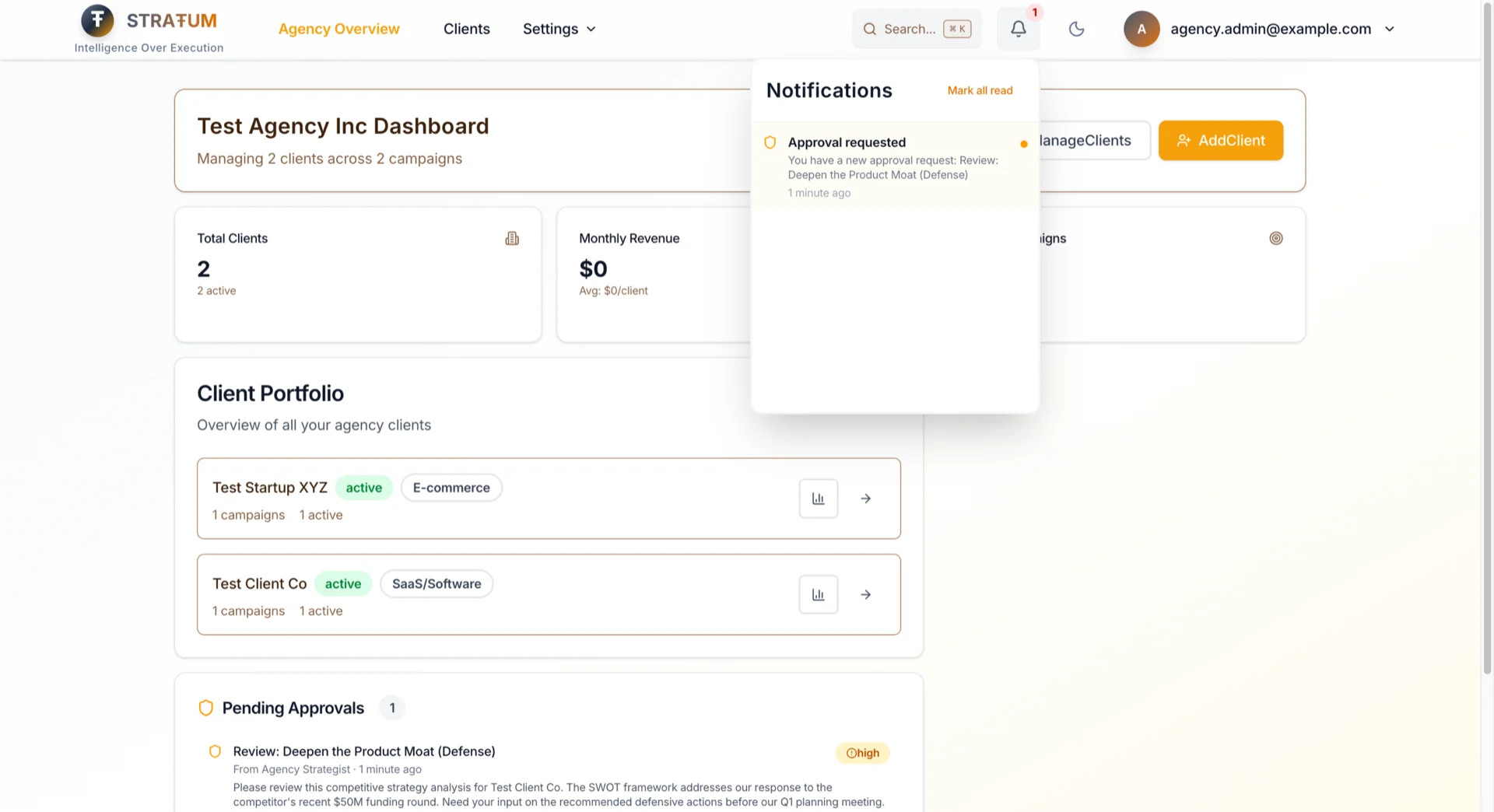
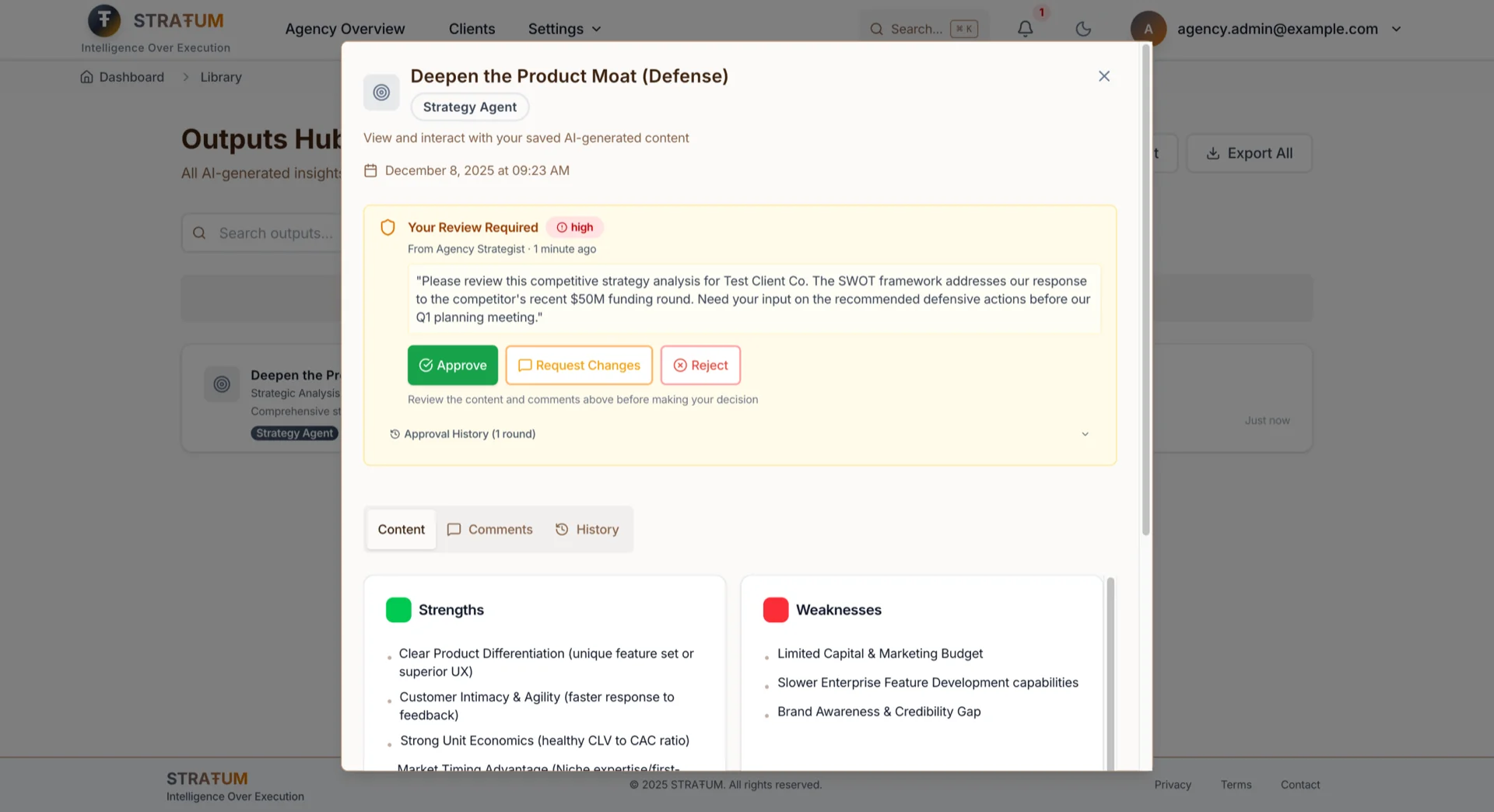
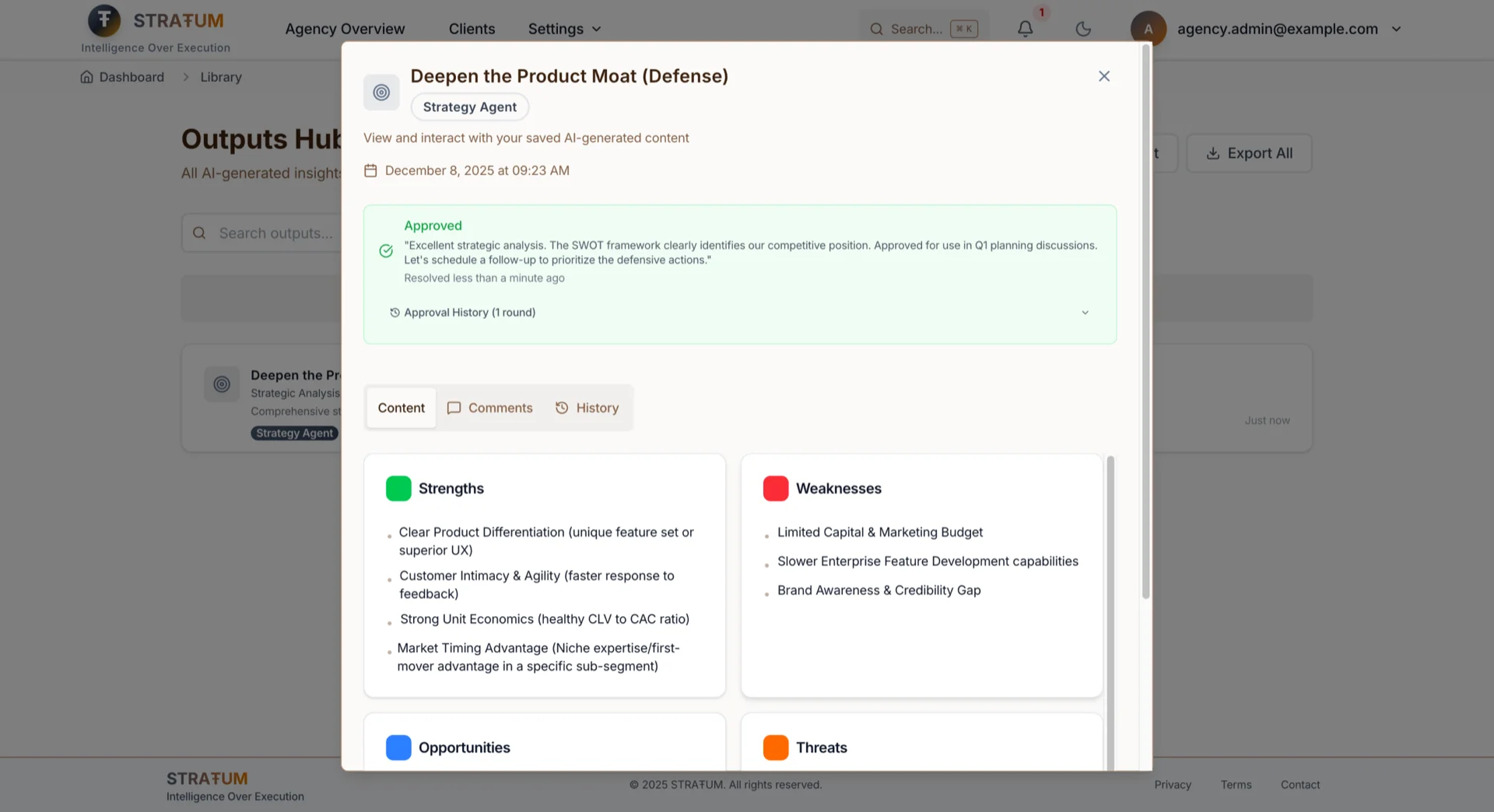
唔使再喺Slack threads問「did you see my email about the Client A copy?」
Comments & @Mentions
直接喺output上面discuss AI-generated work——唔係喺lost嘅Slack threads入面。
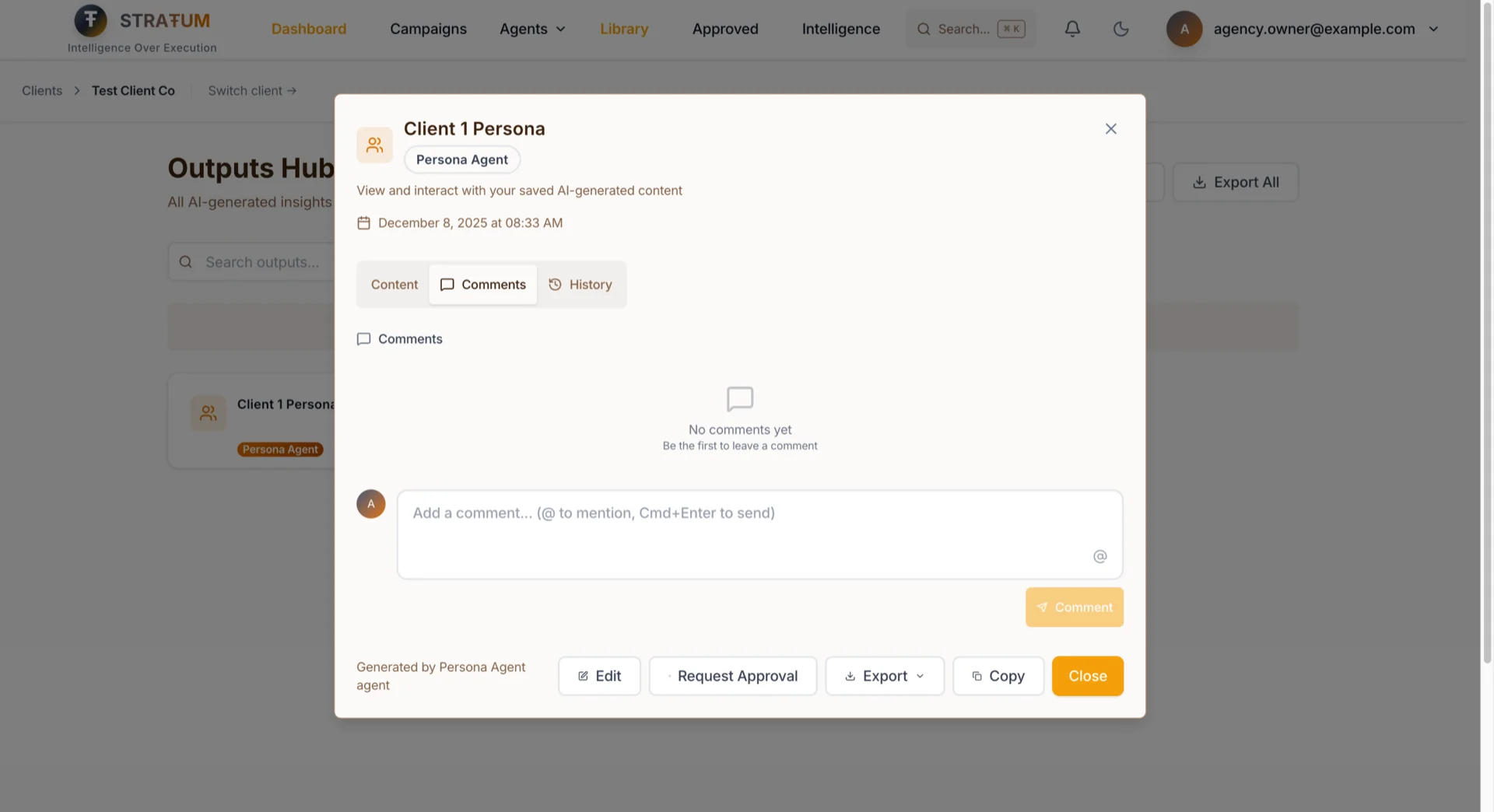
- Threaded comments on任何campaign、output、或persona
- @mentions notify specific team members
- Resolution tracking 等你知咩已經被addressed
- Client-scoped for agencies——freelancers只見到佢哋assigned clients嘅comments
Task Assignments
For SME Marketing Directors: 停止用spreadsheets track邊個做緊咩。直接由output assign content creation、reviews、同campaign tasks——你team見到佢哋嘅work queue,你見到status。
For Agency Account Managers: Keep client deliverables on track。喺你client scope內assign tasks,set priorities同due dates,有嘢blocked即刻知。
點運作:
- Task types:Content creation、review、analysis、campaign setup
- Priority levels:Low、normal、high、urgent
- Due dates 有approaching deadline notifications
- Linked resources:Tasks connect到specific campaigns或outputs——冇「我哋講緊邊個document?」
- Status tracking:To-do → In progress → Review → Done
Role hierarchy keep佢clean——Account Managers喺佢哋client scope內assign,Directors可以assign俾佢哋teams,Owners可以assign俾任何人。
Real-Time Notifications:永遠唔Miss需要你Attention嘅嘢
For忙嘅Marketing Directors同Agency Owners: 停止每5分鐘check Slack wondering有冇人需要你。STRATUM exactly告訴你幾時需要action:
- 有人request你approval → 你即刻知
- 你嘅approval request被resolved → 唔使再wonder「佢哋見到未?」
- 你喺comment被@mention → relevant conversations搵到你
- 有task被assign俾你 → 佢出現喺你work queue
- Due date approaching → 你喺遲之前被warn
Notifications real-time出現喺app入面,如果你miss咗會roll up入email digests。
---
Feature 3:New Hires 30秒Productive,唔係3日
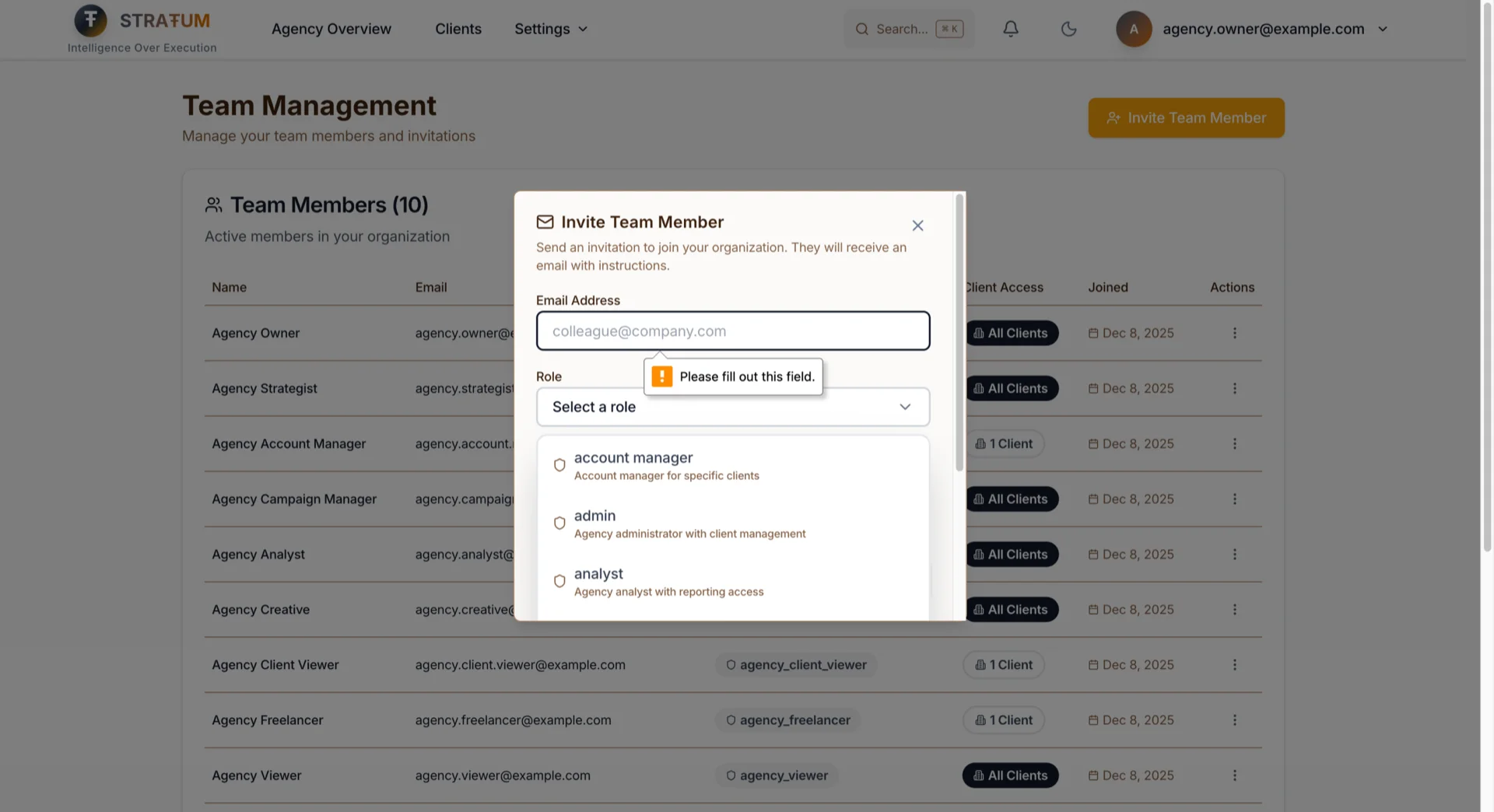
之前: 新team member?以下係process:
1. 佢哋另外signup
2. 你email我manually加佢哋入你嘅org
3. 我喺database assign佢哋嘅role
4. 佢哋login然後...可能work?
而家:
1. Settings → Team → Invite
2. 入email,揀佢哋嘅role
3. 佢哋㩒link,set password
4. 佢哋入咗。有right permissions。即刻。
點解30秒重要
For Marketing Directors onboard一個新analyst:佢哋day one就可以productive,唔係day three。
For Agency owners加一個freelance creative:冇IT tickets,冇等,冇「I'll get to it tomorrow。」
For Founders bring on一個VA:喺send一個Slack message嘅時間內俾佢哋view access。
令呢個Possible嘅Technical Choice
大部分platforms用email confirmation flows:invite → confirmation email → click link → set password → another confirmation → finally log in。
我skip咗redundant confirmation。如果你收到invitation email,你已經prove你own嗰個email address。點解要你prove兩次?
Invitation link係secure,store喺我哋servers上面(唔係喺URL parameters入面邊個可以tamper),7日expire。當你accept,所有嘢一步發生:
1. 你嘅account被create
2. 你被加入right organization
3. 你嘅role permissions被assign
如果任何嘢fail,冇嘢被create。冇half-finished accounts。冇missing permissions。冇「I invited them but they can't see anything」support tickets。
---
Defense in Depth:我點Build Data Isolation
我知呢個section可能比大部分readers需要嘅更technical,但我覺得important去transparent講我點諗security——特別係for trust我handle佢哋client data嘅agency users。我仲喺private alpha,但呢個唔代表我cut corners on architecture。Data isolation由day one開始build——唔係之後bolt on。以下係layered approach:
Layer 1:Database-Level Enforcement(Row Level Security)
Permissions唔止喺application code check——佢哋被database itself用Postgres Row Level Security(RLS)enforce。每個query自動filter by organization。你嘅analyst睇唔到另一個org嘅data因為database唔會return佢——regardless of application request咩。
For client-scoped roles,第二個RLS policy filter by assigned clients。Client A嘅Account Manager唔可以access Client B嘅data即使佢哋craft一個direct API request。
Layer 2:Application-Level Permission Checks
UI respect同一個permission rules。如果你唔可以access一個client,佢唔出現喺你dashboard。如果你唔可以run一個agent,button被disabled。Navigation、buttons、同pages全部check同一個permission source——冇inconsistencies where UI show嘢但API reject。
Layer 3:Atomic Transactions
Critical operations好似invitation acceptance作為single database transactions發生。Create account、add to org、assign role、set client access——全部一齊succeed或者全部一齊fail。冇half-finished states。冇orphaned records。
Layer 4:Server-Side Secrets
Invitation details(organization、role、client assignments)store喺我哋servers,referenced by一個secure token。Invitation URL只contain token——tamper佢唔會grant different access因為actual permissions住喺我哋database入面。
---
Alpha transparency: 我哋deliberately build咗呢啲layers,但我哋係small team同STRATUM仲喺evolving。睇我哋嘅Privacy Policy同Terms了解alpha期間我哋可以同唔可以guarantee嘅full picture。
---
點解喺Alpha Build呢個?
以下係honest answer:因為retrofit team features係brutal嘅。
我見過companies try喺launch之後加multi-tenancy。佢係nightmare。每個table需要new columns。每個query需要new filters。每個permission check需要rewrite。Data migrations令人恐懼。
我由Day 2開始就有organization-scoped data咁build STRATUM(嗰個係另一個故事)。Architecture ready for teams。Features只需要被...build。
有50個users build team features代表:
- Fast iteration: 我可以ship、get feedback、同幾日內fix,唔係幾個月
- Real usage patterns: 我見到teams actually點collaborate,唔係我想像中嘅方式
- 冇migration risk: 冇existing team workflows要break
Alternative——等到有1,000個users然後話「surprise,而家你需要restructure你成個workflow for teams」——seem worse。
而家試
Team features for所有STRATUM users都live喇。
如果你係existing user:
1. 去Settings → Team
2. 㩒「Invite Team Member」
3. 睇佢哋30秒onboard
如果你係新嘅:
喺stratum.chandlernguyen.com申請alpha access。喺你request入面mention「team collaboration」——我仲喺「talk to every user」phase,我好想walk你through呢啲features點fit你team。
---
Unconventional Bet
喺Alpha build team features係unconventional。大部分advice話:先get users,之後加collaboration。
但teams就係marketing actually work嘅方式。Marketing Director唔係自己create strategies。Agency Owner唔係solo run client accounts。Collaboration唔係nice-to-have feature——佢就係work get done嘅方式。
由一開始就為teams build代表STRATUM同你一齊grow。Start solo,ready嘅時候invite你第一個teammate,scale到full agency team而唔使switch platforms。
呢個bet可能係錯嘅。但望住我alpha users screenshot同copy-paste佢哋嘅way around缺乏sharing...我唔覺得係。
最終,build products係關於為real people解決real problems——唔係follow一個話「等到你有1,000個users」嘅playbook。我寧願build我50個users而家actually需要嘅嘢,而唔係chase一個growth chart上嘅數字。
如果你run緊marketing team(或agency),我真心想聽你今日點handle collaboration。你喺「screenshot and paste」camp?「share one login」camp?Something better?話俾我知——我仲喺learning同每段conversation都幫我build呢個嘢得更好。
祝好,
Chandler
我亦喺build DIALØGUE——如果你好奇我apply同一個「early build for teams」thinking喺AI podcast generation會點,睇吓啦。