Chatbot v2.10 發佈:以增強速度、擴展性同簡潔性提升用戶體驗
我用FastAPI同async processing重建咗chatbot,大幅縮短response time同時簡化interface——以下係targeted optimizations點樣transform用戶體驗。
更新(2026年): 呢個chatbot演變成咗Sydney!經過好多次迭代——Flask到FastAPI,FAISS到Weaviate到Supabase pgvector——Sydney而家喺/ask/,用Claude加streaming responses。下面嘅FastAPI patterns係通往我哋而家狀態嘅stepping stone。
2024年2月嘅原文保留如下作為context。
兩星期前,我分享咗我嘅chatbot v2嘅消息,用Langchain framework,以FAISS作為vector store。嗰係一個raw嘅故事,講我點樣喺幾個月嘅iterative work之後從coding quicksand中emerge。
雖然version 2比version 1有significant improvement,但仲有好多問題令我唔satisfied。最大嘅可能係performance;更準確咁講,就係太慢 :P 另外,front-end interface太複雜,intro sentences太多,搞到chat box喺畫面好低嘅位置。
呢篇文會highlight v2.10點樣apply targeted performance optimizations同UX improvements嚟unlock更smooth、更快、更capable嘅conversational experience。
轉用FastAPI:Performance嘅一大躍進
v2.10增強performance嘅backbone在於我哋轉用FastAPI。呢個modern web framework唔止加快response times,仲引入咗更robust同scalable嘅architecture。
v2 Flask framework
# Initialize Flask app and Langchain agent
app = Flask(__name__)
CORS(app, resources=\{r"/query_blog": {"origins": "https://www.chandlernguyen.com"\}})
app.debug = False
limiter = Limiter(app=app, key_func=get_remote_address)
Flask serve咗我哋好好,提供simplicity同flexibility。但隨住user base增長,需要更performant嘅solution變得明顯。
v2.1 FastAPI framework
# FastAPI with advanced CORS and async support
# Initialize FastAPI app
app = FastAPI()

# Configure CORS for production, allowing only your frontend domain
origins = ["https://www.chandlernguyen.com"]

app.add_middleware(
    CORSMiddleware,
    allow_origins=origins,
    # allow_origins=["*"],
    allow_credentials=True,
    allow_methods=["POST"],
    allow_headers=["Content-Type"],
)
FastAPI透過asynchronous support增強performance。
Asynchronous Processing:更流暢嘅對話
利用FastAPI嘅asynchronous features,v2引入non-blocking request handling,令用戶互動更smooth同dynamic。以下係一個例子。
# Function to check content with OpenAI Moderation API (sensitive keys are loaded from environment variables)
async def is_flagged_by_moderation(content: str) -> bool:
    openai_api_key = os.getenv('OPENAI_API_KEY')
    if not openai_api_key:
        logging.error("OPENAI_API_KEY not set in environment variables")
        raise HTTPException(status_code=500, detail="Server configuration error")

    headers = \{"Authorization": f"Bearer {openai_api_key\}"}
    data = \{"input": content\}

    async with httpx.AsyncClient() as client:
        response = await client.post("https://api.openai.com/v1/moderations", json=data, headers=headers)

    if response.status_code == 200:
        response_json = response.json()
        return any(result.get("flagged", False) for result in response_json.get("results", []))
    else:
        logging.error(f"Moderation API error: {response.status_code} - {response.text}")
        return False
用戶界面增強
v2.10嘅front end經過重新設計,增強visual appeal同user engagement。以accessibility同user experience為focus,新設計更簡單更直觀。
減少過多嘅introductory content
呢堆text而家冇咗。
<div class="container mt-5">
  <h2 style="color: #454545; text-align: center;">Welcome to My Expat Life in America Chatbot!</h2>
  <h3 style="margin-top: 15px; text-align: center;">
    Get Answers to Your Questions on Living, Working, and Thriving in the US
  </h3>
  <h4 style="margin-top: 10px; text-align: center;">Ask about:</h4>
  <ul style="list-style: none; text-align: center; color: #333;">
    <li>Adapting to American Culture & Lifestyle</li>
    <li>Navigating US Personal Finance & Banking</li>
    <li>Tips for Relocation and Settling In</li>
    <li>Understanding Healthcare and Insurance</li>
    <li>Getting Around - Driving and Transportation</li>
    <li>Education Opportunities and Resources</li>
    <li>Professional Development and Networking</li>
  </ul>
  <h5 style="margin-top: 10px; color: grey; text-align: center;">
    I'm here to provide helpful info and insights on the expat experience. What would you like to know?
  </h5>
  <h6 style="margin-top: 5px; color: grey; text-align: center;">
    Go ahead, ask me anything! I'll do my best to give a thoughtful response <span style="font-weight: bold; color: #007bff;">in a few seconds.</span>
  </h6>
呢個係replacement
<h2 style="color: #454545; text-align: center;">Welcome to Chandler's Expat Life Chatbot!</h2>
    <p style="text-align: center; margin-bottom: 20px;">Ask me anything about expat life in the US, from culture to finance.</p>
視覺上,呢個change係咁嘅
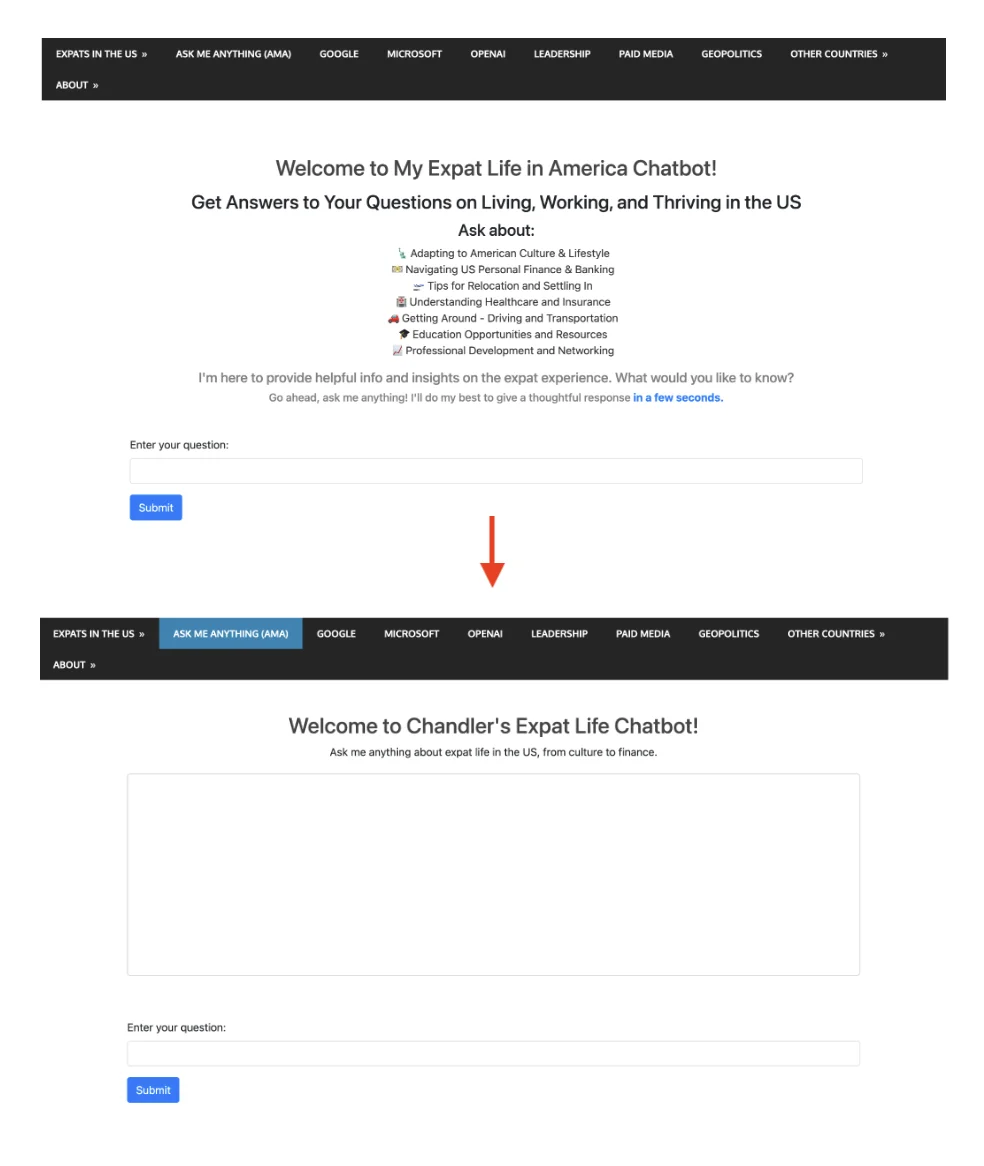
額外styles嚟減少white space同改善layout
<style>
        /* Additional styles to reduce white space and improve layout */
        body, html \{
            height: 100%;
            margin: 0;
            display: flex;
            flex-direction: column;
        \}
        .container \{
            flex-grow: 1;
            display: flex;
            flex-direction: column;
            justify-content: center; /* Center vertically in the available space */
        \}
        #conversation \{
            height: 300px; /* Adjust based on your preference */
            overflow-y: auto;
            border: 1px solid #ccc; /* Add border to conversation box */
            padding: 10px;
            border-radius: 5px; /* Optional: round corners */
        \}
    </style>
#conversation box嘅styling加上specified height同overflow control對維持clean同user-friendly嘅chat interface特別effective。
<!-- Area to display the conversation -->
    <div id="conversation" aria-live="polite" class="mb-5" style="height: 300px; overflow-y: auto;"></div>
喺conversation div加aria-live="polite"對screen reader用戶係一個thoughtful嘅addition,令佢哋知道dynamic content嘅changes。
自動Focus Input Field
喺AJAX success同error callbacks尾端加$('#user-query').focus();係一個user-friendly嘅feature,確保每次message提交後input field自動focused,令chat體驗更smooth。
利用Langsmith做Performance Monitoring同Observability
喺呢個version 2.10,我用緊langsmith。Setup好簡單,dashboard interface都夠直觀。
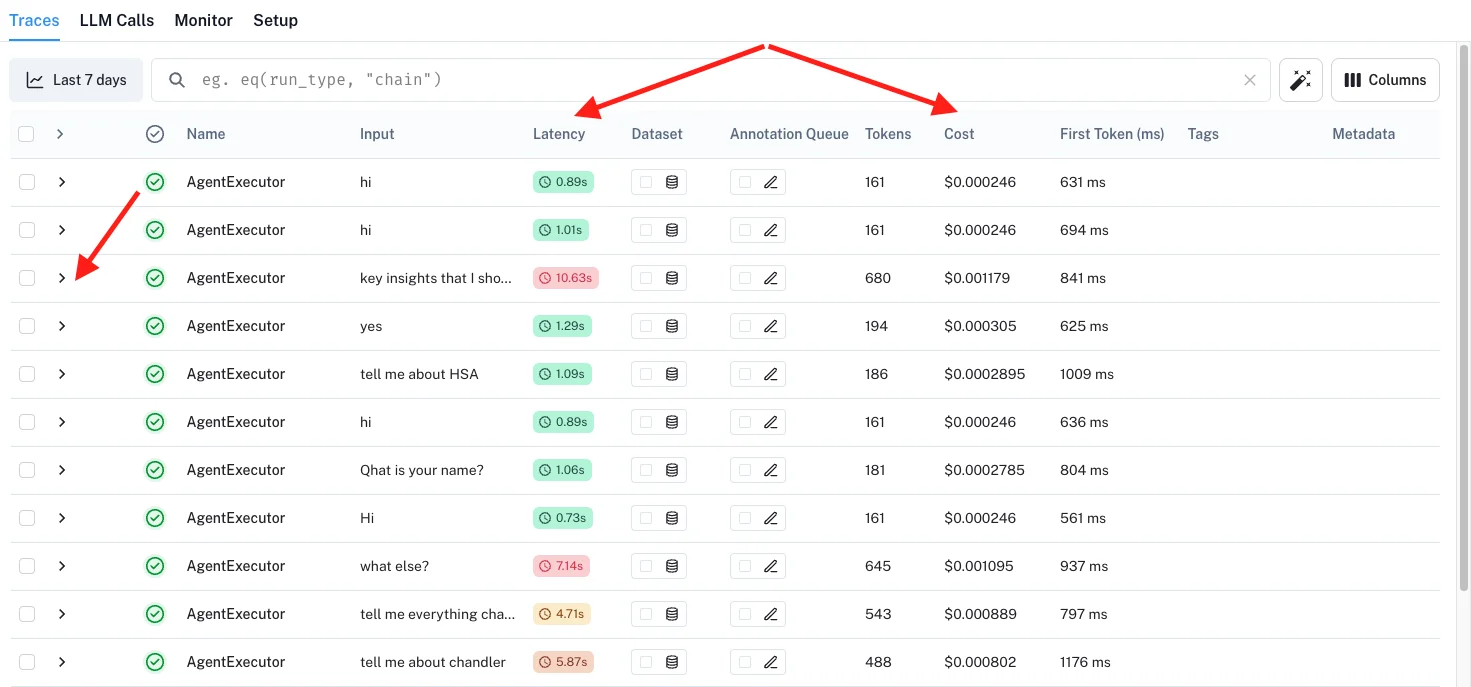
每當我留意到某個query太耐,我可以「click」入去了解究竟journey嘅邊個部分有問題。
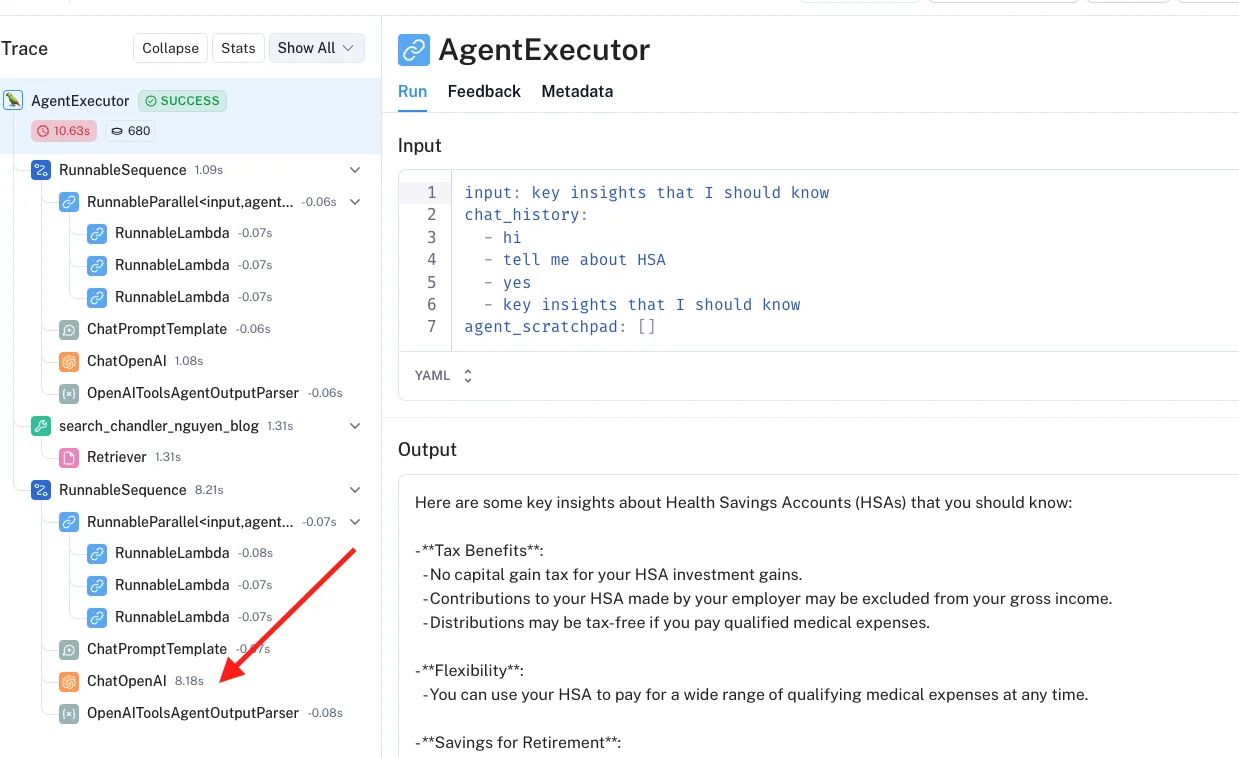
Version 2.1嘅完整back-end code
一如既往,我喺GitHub 呢度分享咗完整嘅back-end code。佢喺同chatbot 2.0一樣嘅repo入面。
我invite你去試吓chatbot :D 問佢任何關於我過去16年寫過嘅嘢。
你有冇試過build chatbot或者migrate between frameworks?我好想聽你有咩performance tricks work到。
祝好,
Chandler