I shipped DIALØGUE's iOS app months ago as a port of the web product. Then I rebuilt almost all of it as a native app.
It is live on the App Store now — if you are curious, go poke at it. The rest of this is what changed, and why.
The difference sounds like semantics until you hold the two versions in your hand. The first one was the web app shrunk to fit a phone: the same tabs, the same creation wizard, the same dashboard. It compiled, it ran, it passed review. And it felt like a website wearing an app costume.
A web app shrunk to a phone is still a web app. Native is not a coat of paint on top of your web layout — it is a different contract with the device. That contract is what I had skipped, and rebuilding to honor it changed the tabs, the audio, the listening surface, the offline behavior, and how the app starts. Here is what that actually meant, screen by screen.
The port was a dashboard
The first version assumed the app's job was to expose the generator. DIALØGUE makes AI podcasts, so the thinking went: put every web surface on screen and you are done.
What you get from that is a dashboard. Five tabs, a multi-step wizard, panels for everything. Nobody opens a podcast app to operate a dashboard. They open it to turn an idea into audio, to listen to something they made, or to start a show they have run before. The ported interface protected the web app's layout. It did not protect those three jobs.
So the rebuild started with the first thing you see.
Three tabs, because a phone punishes tabs
The old app opened to five tabs: Library, Studio, Create, Credits, Profile. That is what porting the web app gets you — every web surface earns a tab.
The rebuilt app has three: Listen, Create, You.
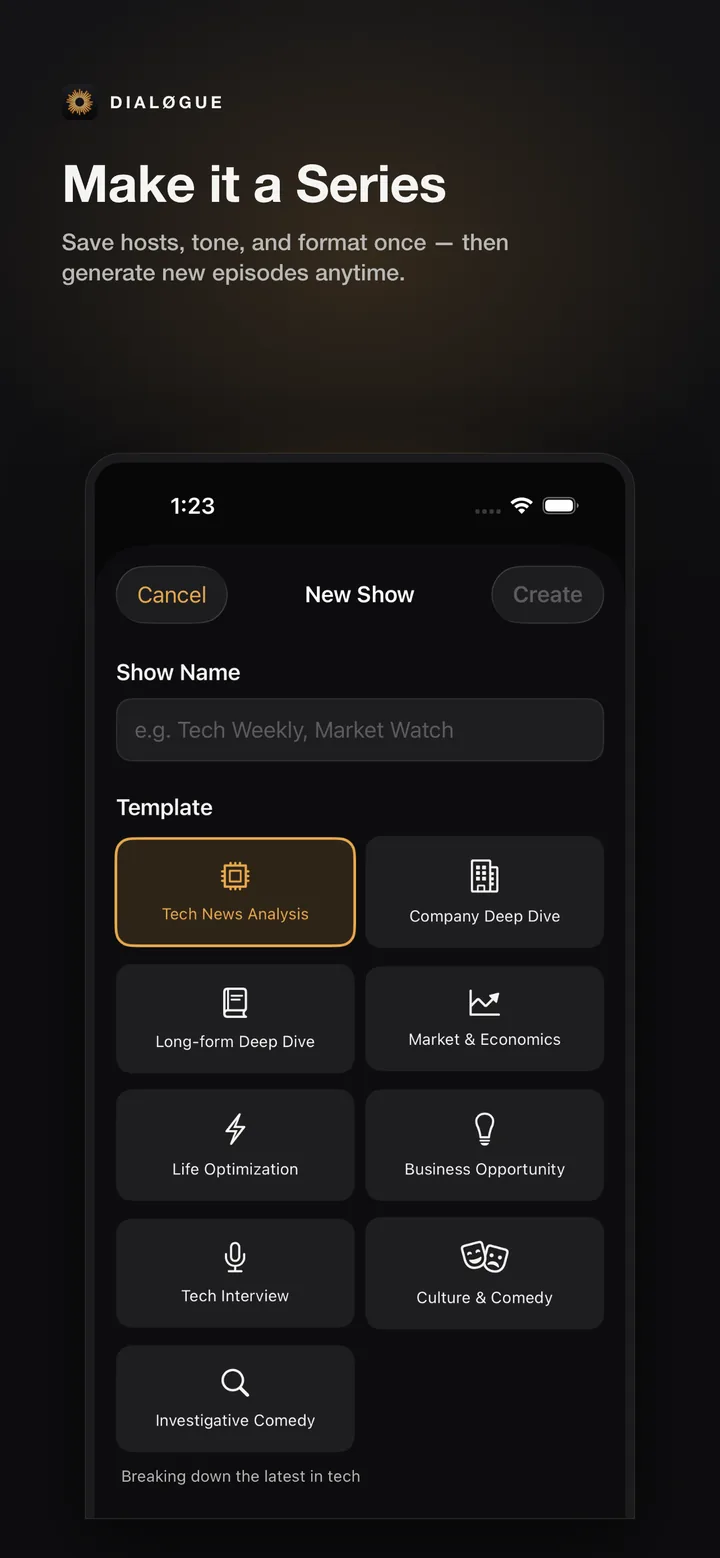
Two tabs did not survive. Credits stopped being a destination — nobody opens an app to stare at a balance. It moved into "You," and the only moment that actually matters, running low right as you go to generate, now surfaces a purchase sheet exactly there. Studio stopped being a place. It became Series — a saved setup (hosts, tone, format, language, source pattern) that lives inside Create and shows up in Listen as a collection, instead of a tab pretending to be a control room. Library and Profile became the plainer "Listen" and "You."
On a desktop, an extra tab is free. On a phone, every tab is a tax on attention. The rebuild paid that tax down.
Audio the way iOS expects it
This is where "native is a contract" stops being abstract.
The ported app was not audio-illiterate. It already showed up on the lock screen with play, pause, and skip, it paused for a phone call, and it stopped when you pulled your headphones out. Those are table stakes, and they were there.
What it could not do was behave like a real audio app once the screen was locked. You could not drag the playhead from the lock screen. There was no cover art there — just text. There was no AirPlay button, no sleep timer, and skip was a fixed fifteen seconds whether you liked it or not.
The rebuild closed that gap with the platform, not around it. The lock screen now carries dynamic episode artwork and a scrubber you can drag to any point. There is AirPlay, a sleep timer that fades the volume out instead of cutting it dead, and a skip interval you can set from ten to sixty seconds — which then drives the lock-screen buttons too, because the system controls should match the app's. The audio session declares itself as spoken audio, so the OS treats it like speech rather than music.
None of this is glamorous. That is the point. On a phone, audio that ignores the lock screen and AirPlay is not "minimal." It is broken in the exact moments people actually listen — walking, driving, with the phone in a pocket.
A transcript only an AI podcast can build
Here is the part that is genuinely ours, not just good iOS hygiene.
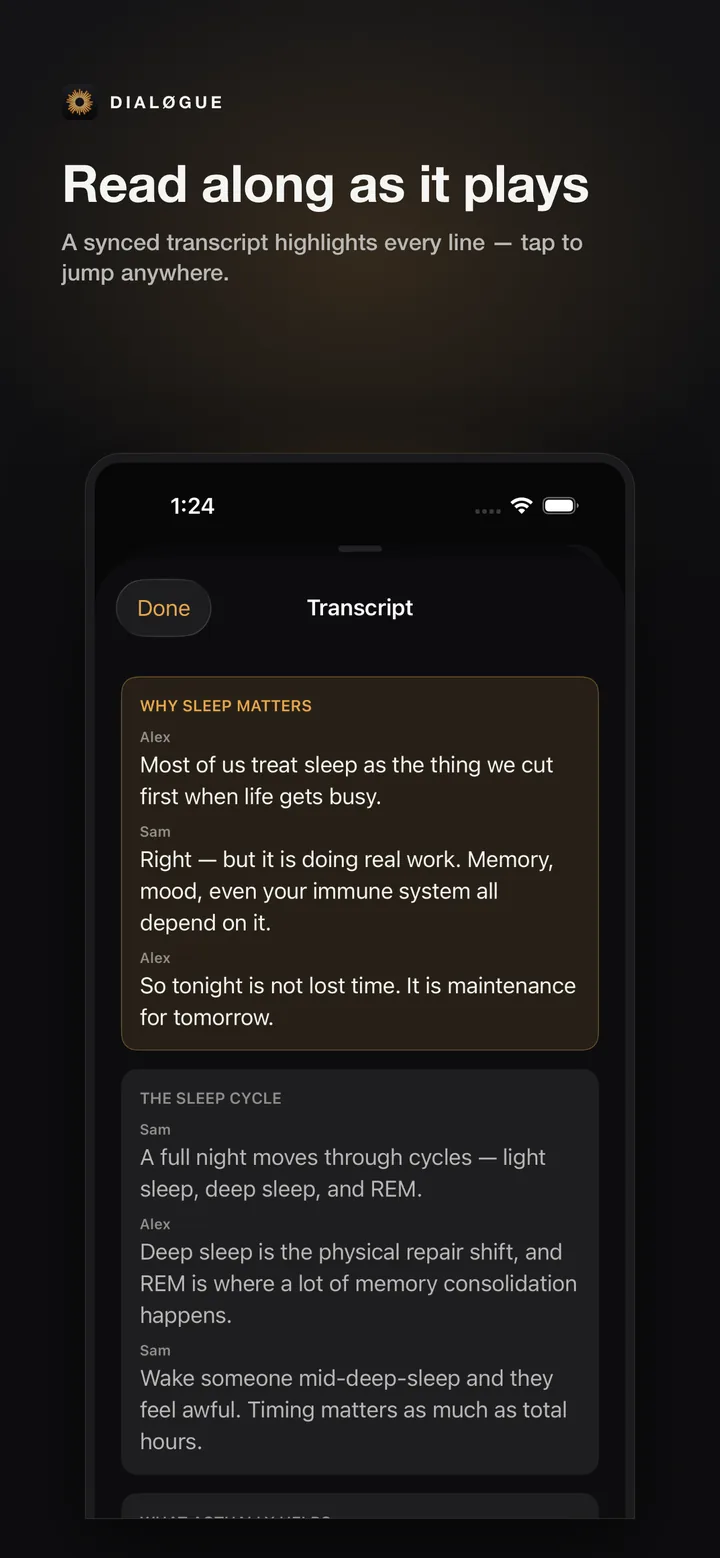
While an episode plays, the app shows a synced transcript: the current line highlights, the view auto-scrolls to keep it centered, and you can tap any line to jump straight to that moment. A generic podcast app cannot really do this, because it does not know what was said when. DIALØGUE does — it generated the script, so it already knows the structure of the episode.
The honest engineering detail is that a line is only tappable when the audio has exact per-segment timing. When the timing is approximate, the line still renders, it just is not seekable, and the app does not pretend otherwise. The same segment timing draws chapter ticks directly on the scrubber, so you can skim an episode like audio but with a map of what the system made. The transcript even shows which host said which line, because the script was written as a two-host dialogue.
This is the difference between bolting a transcript onto a player and treating the generated script as the source of truth for the whole listening experience.
Two things make that work, and neither shows up on screen. The backend stamps every segment with its start and end time and marks whether the timing is exact or only estimated — so the app can let you tap an exactly-timed line and quietly decline to fake it on an estimated one. And your playback position is saved on the server, not just the device, so "pick up where you left off" holds even when you start an episode on the web and finish it on the phone.
Offline that survives a real commute
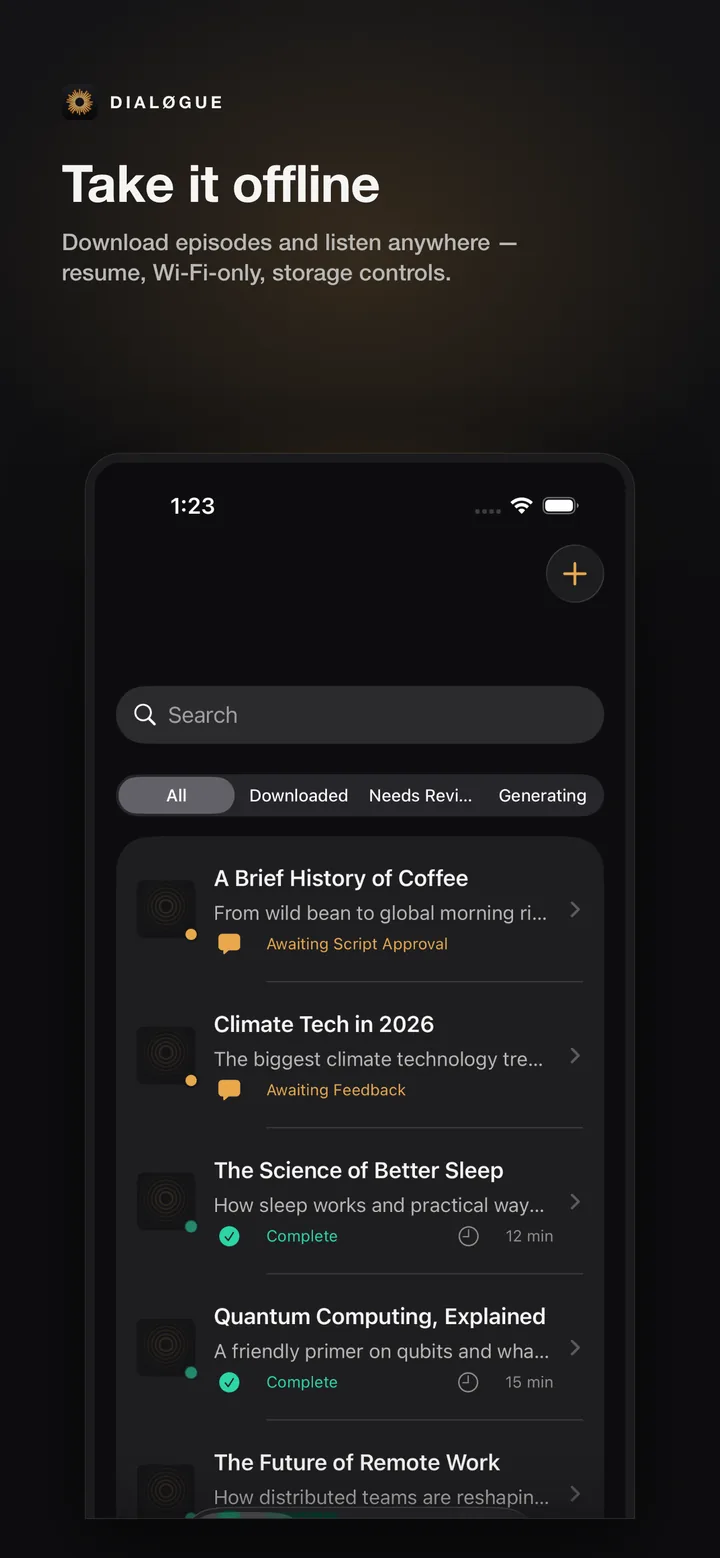
The app could download episodes from the start. That is not new, and I want to be precise about it. What the rebuild added is resilience — the difference between a download feature and offline you can trust.
An interrupted download now resumes from where it stopped instead of starting over, because the app saves the system's resume data per episode and restarts from it. There is a WiFi-only option that genuinely forbids cellular, so a queued download waits for WiFi rather than quietly burning your data plan. Downloads run at most three at a time in a FIFO queue instead of stampeding the network. There is a storage view to see and delete what is on the device. And the transient fetches that fail on a flaky connection retry with backoff — three attempts, half a second growing to a cap, never retrying a user cancellation.
Retrying is easy; retrying without fighting a user who hit cancel is the part that makes offline feel solid on a bad subway connection instead of spinning.
Instant, because a spinner reads as broken
On a phone, latency is a feeling, not a number. A spinner on cold launch reads as "this app is broken," even when nothing is wrong.
The ported app re-downloaded every cover image on each cold launch, so the library opened as a wall of spinners. The rebuild added a shared memory-and-disk cache for cover art — the disk layer survives relaunches, the memory layer keeps scrolling smooth, and the lock screen reuses the same cache for its artwork. Reopening an episode used to wait on a network round trip; now the segments and transcript are cached per episode and render immediately, then refresh quietly in the background. I also pulled the every-half-second playback tick out of the list rows so the timer stops forcing the whole library to redraw.
It is not a feature you can screenshot. It is the gap between an app and a website.
It pings you when the episode is ready
Generating a podcast takes minutes, not seconds — there is research, an outline, a script, then audio. The ported app made you watch a progress bar the whole time. The native app does not.
With your permission, it sends a push notification the moment your episode is ready, so you can lock the phone, do something else, and come back when it buzzes. The device token is stored server-side, only the notification job can read it, and you can turn the whole thing off in settings. It is a small piece of plumbing — a table, a worker, Apple's push service — but it changes the felt shape of the product from "wait on this screen" to "I'll tell you when it's done."
The workflow can start from outside the app
A native app does not only live inside its own window. The rebuild added Siri and Shortcuts support through App Intents, so "create a podcast," "resume listening," and "open my podcasts" work as spoken phrases, in the Shortcuts app, and in Spotlight — no special entitlements required. The decision of what "resume" should do (continue the current episode, or open the library if nothing is loaded) is a tiny pure function I could unit-test on its own, which is the kind of thing that keeps Siri behavior from drifting.
There is also a restrained three-page welcome on first run — create, voices, listen anywhere — shown once, and deep links so a tapped link opens the right screen instead of dumping you on the home tab. Small things. They are the difference between an app that sits on the phone and one that belongs to it.
A word on where I stopped: there are no home-screen widgets, no Live Activities, and no CarPlay yet — each needs its own extension or an Apple-granted entitlement, and I chose to ship the listening core first. "Native" here is a direction, not a finished checklist.
The lesson I am taking from this
If you are porting something to a new platform, the tempting move is to make it run there and call it done. It will run. It will also feel borrowed.
Native is a contract with the device: respect the lock screen, the route changes, the offline reality, the system surfaces people already use. A port honors your old layout. A native app honors the platform's conventions, even when that means deleting tabs and rewriting screens you already shipped.
I do not have dramatic install or retention numbers to wave around — the current version is live on the App Store, and that is the honest state of it. The real test was never whether the screenshots looked native. It is whether someone makes an episode, listens to it on a walk with their phone locked, and comes back to make another.
If you build for mobile, I am curious where you draw the line: when is "it runs on the phone" enough, and when does the platform's contract force you to rebuild?
Frequently Asked Questions
What changed in the DIALØGUE iOS rebuild?
The app went from a port of the web product to a native rebuild. The information architecture dropped from five tabs to three (Listen, Create, You). The listening experience gained a synced tap-to-seek transcript, chapter markers, lock-screen scrubbing and artwork, AirPlay, a sleep timer, and configurable skip intervals. Offline downloads became resilient, the app caches cover art and segments for an instant feel, Siri/Shortcuts let the core actions start from outside the app, and a push notification tells you when an episode is ready.
Why did five tabs become three?
Because a phone punishes every extra tab. Credits was not a place anyone wanted to visit, so it folded into "You" plus a purchase sheet that appears when you actually run low. Studio became Series — a saved setup inside Create rather than its own tab. Library and Profile became the plainer "Listen" and "You."
What native iOS features did the rebuild add?
Lock-screen scrubbing and dynamic artwork, AirPlay, a sleep timer with a volume fade, configurable skip intervals (10–60s) that also drive the lock-screen controls, chapter ticks on the scrubber, a synced tap-to-seek transcript, resilient offline downloads (resume, WiFi-only, storage management, capped queue), shared cover-art and segment caches for instant rendering, Siri/Shortcuts intents, "episode ready" push notifications, server-side playback position that resumes across web and phone, deep links, and first-run onboarding.
Does the synced transcript work for any episode?
A transcript line is tappable to seek only when the audio has exact per-segment timing. When the timing is approximate, the line still displays but is not seekable, and the app does not pretend otherwise. The transcript is possible because DIALØGUE generated the script, so it knows the structure and who said what.
What is the difference between Studio and Series?
Studio implied a control room full of knobs. Series is just a saved setup — hosts, tone, format, language, and source pattern — that lets you start the next episode without reconfiguring everything. It is a preset inside Create, not a standalone tab.
How is this different from NotebookLM's audio overviews?
NotebookLM is genuinely useful, and free, for turning your sources into a quick audio overview. DIALØGUE is trying to be a full native listening product on top of generation: outline and script review before any audio, voice selection, a synced tap-to-seek transcript, chapters, lock-screen and AirPlay controls, offline downloads, Siri, and Series for repeatable shows. The honest difference is less "who generates better audio" and more "what happens to the episode after it exists."
Did the rebuild add offline listening?
Offline downloads already existed. The rebuild made them resilient: interrupted downloads resume instead of restarting, there is a WiFi-only option and a storage view, downloads run at most three at a time, and transient network failures retry with backoff without fighting a user who cancels.
That is it from me for now.
Cheers, Chandler